
Free to start · Same character, every sticker
AI Sticker Generator
Describe a sticker, or a whole sheet, and get bold die-cut designs with thick borders and clean shapes. Turn your pet or mascot into a set that stays on-model. Free to start, in your browser.
No installation. No credit card. Private by default.
- 10Reference images on Mango 3
- 1:1Square, or any standard shape
- 0Watermarks
- $0Free to start
The basics
What is an AI sticker generator?
An AI sticker generator draws sticker-ready art: a simple subject with a bold outline, flat or softly shaded color, and a thick white border, on a background that is easy to cut away. You can make one design or a whole sheet in a single image.
Mage is a good fit when the stickers share a character. Save your mascot, your pet or your persona once in the Characters system and every sticker uses the same one, in a new mood or pose each time. Mango 3 holds the character steady across a set, and GPT Image 2.5 Flare handles stickers with words on them.
One honest limit up front: Mage does not export transparent PNGs or cut lines. Ask for a plain, solid background, and your print shop's software or your design tool can trace the outline and remove the background. That is a normal step with any artwork, and the thick border makes it easy.
A little more possibility
Why creators design stickers on Mage
Your mascot on every sticker
Save a character from one image and call it with @handle, so a set of twelve still looks like one family.
Pets work too
Create a character from a clear photo of your cat or dog and turn it into a whole sticker pack.
Lettering that reads
GPT Image 2.5 Flare and Nano Banana 2.1 render short words, for speech-bubble and pun stickers.
One sticker or a sheet
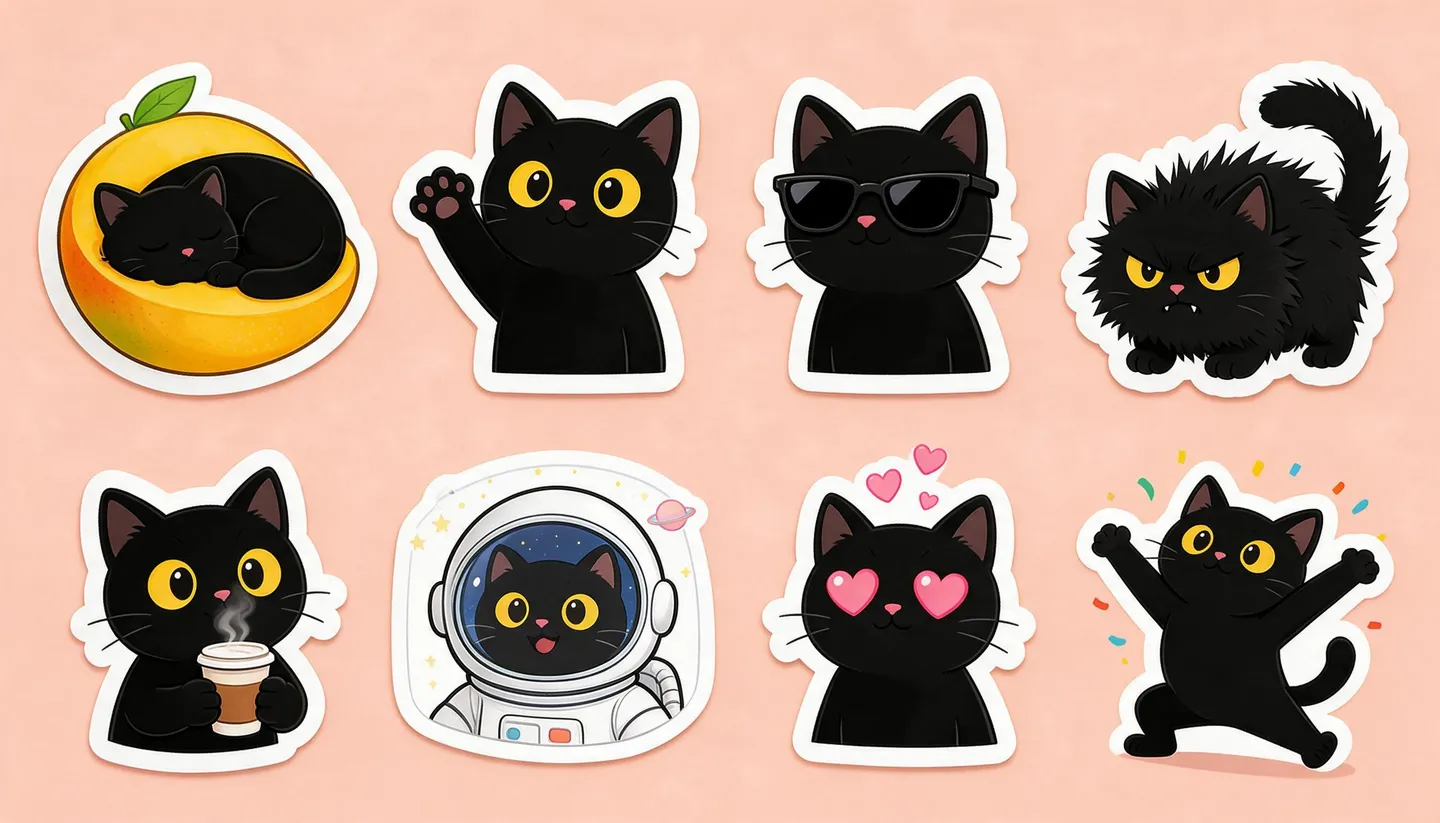
Ask for a single design on a square, or a grid of eight on one wide image.
Iterate freely
Mango is unlimited at 1K and 2K from Pro at $30 a month, so you can redo a sticker until the pose is right.
Ready to sell
A commercial license comes with every paid plan, for stickers you sell online or at a market stall.
From idea to creation
How do you make stickers with AI?
It takes three steps, and it is free to start.
Open Mango
Use the button on this page, then pick Mango 3 in the model menu. Mango 3 Turbo is the cheaper choice for drafts.
Add your character
Mention a saved character by @handle, or attach a photo of the subject as a reference image.
Describe the sticker
Name the pose and the mood, then ask for a bold outline, a thick white border and a plain solid background.
Make the set and export
Change the mood line for each sticker, download your favorites, and remove the background in your design or print tool.
Tips and techniques
How to prompt for sticker-style art
Sticker art is about silhouette. A subject that reads as one clear shape, with a bold dark outline and a thick white border, survives being shrunk to two inches and stuck on a water bottle. Ask for that directly. 'Die-cut sticker, thick white border, bold outline, flat colors, plain light gray background' is a dependable base.
Then add the subject and the mood: a black cat drinking coffee, sleepy; the same cat in sunglasses, smug. Short mood words give a set its range while the base line keeps every sticker in the same style.
- Keep one subject per sticker; busy scenes do not survive small sizes.
- Ask for a plain, solid background, not white on white, so the border stays visible.
- Use the same base style sentence for every sticker in a set.
- Add text only when it is two or three words.
- Generate on a square for single stickers and on 3:2 or 16:9 for a sheet.
Tips and techniques
Turning your pet or mascot into a sticker pack
Characters are what make a sticker pack feel like a pack. Create a character from one clear photo, then reuse it in every prompt by @handle. It works for people, mascots and pets alike, and the same character can go on to avatars, cartoons and memes.
Plan the set before you generate: eight moods, eight poses or eight inside jokes. Writing the list first keeps the pack varied and stops you making four versions of the same sticker.
Tips and techniques
Getting stickers ready to print
Download each sticker at the largest size the model offers. Mango 3 outputs at 1K or 2K, and Image Enhancer can upscale a design to 4K or 6K if your printer asks for more pixels. Then remove the background and create the cut line in your design tool, or upload the image to a print shop that does it for you.
Check small details at print size before ordering. Fine lines and tiny text that look sharp on screen can disappear on a two-inch sticker; if they do, ask for a thicker outline and fewer details.
The right model for the job
Best models for stickers
Character consistency and clean shapes matter most; text matters sometimes.
Mango 3
Mage's flagship: keeps one character the same across a whole set and takes up to 10 reference images. Unlimited at 1K and 2K from Pro.
Mango 3 Turbo
The fast, low-cost Mango, with characters and references: ideal for drafting a dozen sticker ideas before you finish the best.
GPT Image 2.5 Flare
For stickers with words: puns, speech bubbles and labels. Low quality is unlimited from Basic. OpenAI's safety filter applies.
Nano Banana 2.1
Graphic stickers with readable text and up to 14 references, at up to 4K. Google's safety filter applies.
Try these prompts
Sticker prompts to try
Swap the subject for your own character or pet.
Pet mood sticker
A die-cut sticker of a black cat sipping coffee from a tiny mug, sleepy half-closed eyes, bold outline, flat colors, thick white border, plain pale blue background.
Mascot sheet
A sticker sheet of eight cartoon stickers of a cheerful mango character in different moods (happy, grumpy, sleepy, in love, surprised, cool in sunglasses, crying, laughing), thick white borders, pastel background.
Lettering sticker
A round die-cut sticker with the words "Plant Mom" in bubbly hand lettering wrapped around a potted monstera, green and cream, thick white border.
Retro travel sticker
A retro travel sticker of a mountain lake at sunset with the word "Wander" in a vintage script, three-color print look, thick white border, plain background.
Room to experiment
Typical sticker makers vs. Mage
Many sticker makers start from clip art or turn a photo into a cutout. Mage draws original artwork from a description and keeps your character the same from sticker to sticker. What it does not do is the cutting: you remove the background and make the cut line in your design or print tool.
Typical sticker makers
- Clip art, or a cutout of your photo
- A new look every time
- Transparent cutouts built in
- A limited set of styles
Mage
- Original art drawn from your description
- One saved character across the whole set
- Plain backgrounds you remove in your own tool
- Any style you can describe, on several models
Follow your imagination
Who uses an AI sticker generator?
Small sellers
Sticker packs for an online shop or a market stall, with a commercial license on paid plans.
Chat and community packs
Reaction stickers of your mascot, your pet or your persona.
Brands and events
Giveaway stickers with a simple mark and a short slogan.
Planners and journaling
Small decorative sets in one consistent style.
Start small. Dream big.
Is the AI sticker generator free?
You can start free with 300 one-time Gems, and every model runs on Gems. Unlimited Mango starts on Pro, along with unlimited character creation for your mascot.
Free
$0
One-time 300 Gems for new members. No watermark.
Basic
$10/mo
Unlimited GPT Image 2 and 2.5 at Low quality for lettering stickers, Inpaint and Refine, 500 monthly Gems.
Pro
$30/mo
Unlimited Mango at 1K and 2K, unlimited character creation, Enhance to 2K, 1,500 monthly Gems.
A little more clarity
Frequently asked questions
Can Mage make transparent PNG stickers?
How do I make stickers of my pet?
Can I sell AI stickers?
Which model is best for stickers?
Is the sticker generator free?
What resolution do I need for printing?

Related generators & guides
Mage is for adults, 18+ only. Nothing illegal is allowed; any content involving minors or non-consensual depictions of real people is strictly prohibited.