
Free to start · Titles that read
AI Poster Generator
Describe the film, the gig or the sale, and get a finished poster with the title spelled right, in portrait or any shape you need. Put your own characters on it, then upscale for print. Free to start, in your browser.
No installation. No credit card. Private by default.
- Up to 4KOn Nano Banana 2.1
- 14Reference images per poster
- 6KWith Image Enhancer
- $0Free to start
The basics
What is an AI poster generator?
An AI poster generator designs the whole sheet from a description: the image, the title, the supporting text and the layout. A good one treats type as part of the picture, so the title sits where a designer would put it instead of floating on top.
Mage runs the models that do this well. Nano Banana 2.1 renders readable titles and credit blocks, takes up to 14 reference images and outputs up to 4K. GPT Image 2.5 Flare is the other text specialist, very literal with a detailed brief. For pure imagery with no type, Mango 3 keeps the same characters across a whole series of posters.
Because the same account holds your characters, references and edits, a poster is rarely one shot. Generate the key art, fix a detail with Inpaint, and run the final through Image Enhancer when it has to be printed large.
A little more possibility
Why creators make posters on Mage
Titles that read
Nano Banana 2.1 and GPT Image 2.5 Flare place and spell your title and credits, so the poster is usable as it comes out.
Your cast on the poster
Save a character once and call it with @handle, and the same face appears on every poster in a campaign.
Any shape
Portrait 2:3 and 4:5 for print, 9:16 for stories, 16:9 for screens, and wide 4:1 and 8:1 banners on Nano Banana 2.1.
Print-ready sizes
Generate up to 4K on Nano Banana 2.1 with Gems, or upscale any poster to 4K or 6K with Image Enhancer.
References in, one design out
Attach a location, a product shot and a color reference, and describe how they come together.
Private until launch
Key art for an unreleased film or event stays in your account until you choose to share it.
From idea to creation
How do you make a poster with AI?
It takes three steps, and it is free to start.
Open Nano Banana
The button on this page opens the Nano Banana family, whose default is Nano Banana 2.1.
Describe the poster
Give the title in quotes, the scene and the mood, and where the type goes: title in the bottom third, credits under it, a tagline at the top.
Pick the shape and resolution
Choose 2:3 for a classic movie poster or 4:5 for social, and 2K or 4K for the final.
Polish and upscale
Fix any detail with Inpaint, then run Image Enhancer if the poster is headed for a large print.
Tips and techniques
Lay out the poster in words
Posters have a hierarchy: one image, one title, then everything else. Describe them in that order. The key image first, then the title with its position and style, then the small print. 'Bold condensed title across the bottom third, small credits block under it' gives the model a layout to follow.
Name the genre and the era when you want a recognizable look: a 1970s screen-printed concert poster, a minimal Swiss-style exhibition poster, a painted fantasy film one-sheet. Style words do more for a poster than adjectives about quality.
- Keep the title to a few words and put it in quotes.
- Say where the title sits: top, bottom third, or across the middle.
- Ask for a credits block or date line as "small text" so it stays small.
- Name one dominant color and one accent.
- For a series, keep the layout sentence identical and change only the image.
Tips and techniques
Put your own characters on the poster
A campaign needs the same faces on every poster. Save each lead once in the Characters system, from a single portrait, and mention them by @handle in the prompt. Nano Banana 2.1, GPT Image 2.5 Flare and Mango 3 all accept saved characters, so the cast holds from the teaser to the final one-sheet. The AI character generator page explains how the Characters system works.
Saved references work the same way for everything else: a location, an outfit, a prop. A poster series for a fictional detective can pull the same rainy street and the same trench coat into every version.
Tips and techniques
Sizing for print and for screens
Generate at the shape you will use. Nano Banana 2.1 offers ratios from 1:1 through 2:3 and 9:16, plus wide 4:1 and 8:1 banners; most other models offer the standard set from 21:9 to 9:21. Cropping a square into a portrait poster later always cuts something you wanted.
For screens, 2K is plenty. For a large print, generate at 4K on Nano Banana 2.1 or Mango 2, or run the finished poster through Image Enhancer, which upscales to 2K, 4K or 6K while sharpening detail.
The right model for the job
Best models for posters
Pick by what the poster needs most: type, characters or resolution.
Nano Banana 2.1
Readable titles and credits, up to 14 reference images, every poster ratio from portrait to wide banner, and output up to 4K. Google's safety filter applies.
GPT Image 2.5 Flare
The most literal with a detailed layout brief, and strong lettering. Up to 15 reference images and 2K output; Low quality is unlimited from Basic. OpenAI's safety filter applies.
Mango 3
Mage's flagship for key art with characters: the same cast across a series, and edits that keep the rest of the poster in place. Up to 2K, so upscale for large prints.
Mango 2
The Mango that reaches 4K, for poster art that needs resolution more than lettering.
Try these prompts
Poster prompts to try
Replace the title and the cast with your own.
Movie one-sheet
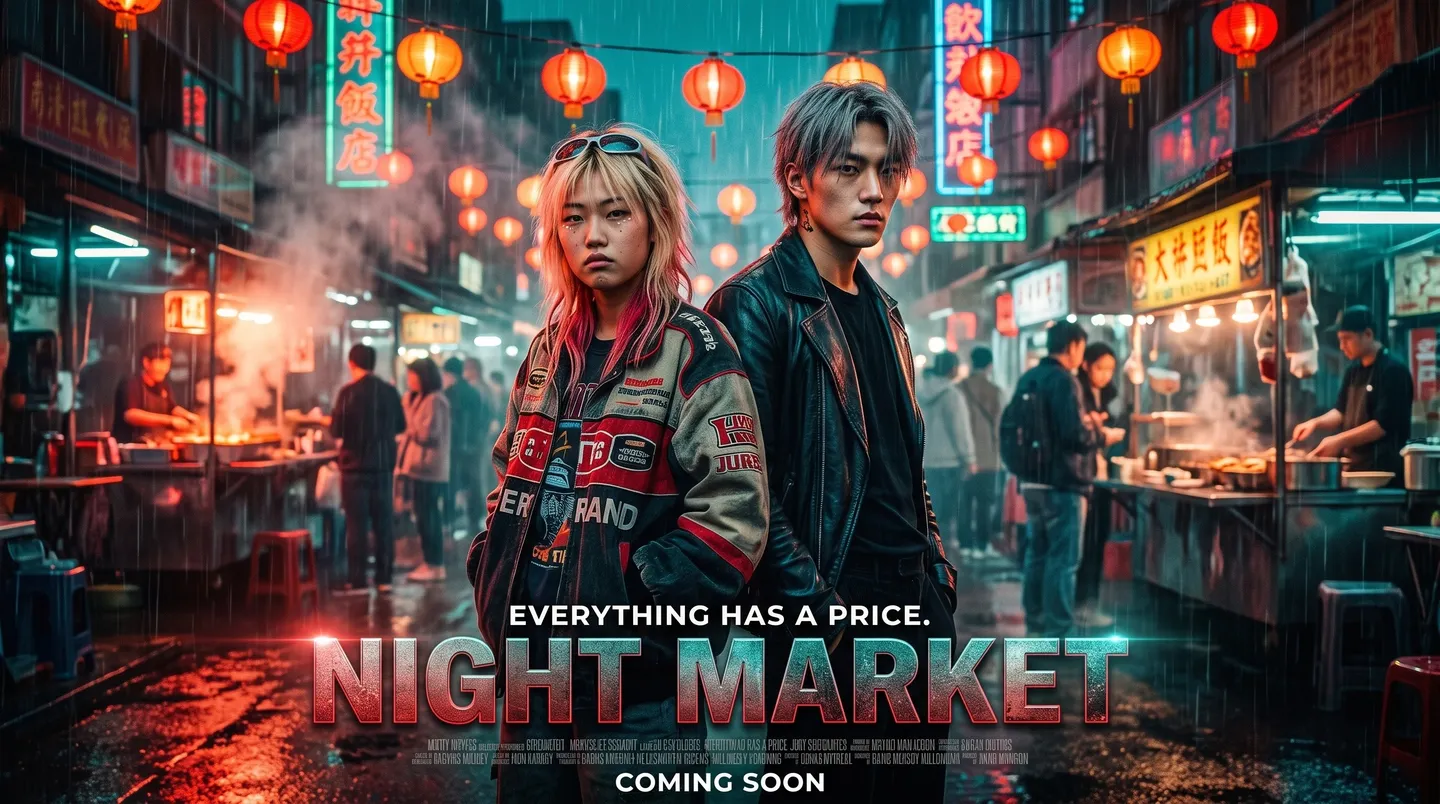
A cinematic movie poster for "Night Market": two leads back to back under red paper lanterns on a rainy street, bold condensed title across the bottom third, a small credits block beneath, teal and orange, 2:3.
Concert poster
A screen-printed style gig poster for "The Lemon Trees, Live at the Harbor", a giant lemon rising like a sun over the sea, two-color print in yellow and navy, band name at the top, date line at the bottom.
Exhibition poster
A minimal Swiss-style exhibition poster reading "Light and Water", a single black-and-white photograph of a breaking wave, red title set flush left, a small grid of text at the bottom.
Fantasy one-sheet
A painted fantasy film poster: a silver-haired queen on a cliff above a burning fleet, the title "The Iron Crown" in carved serif letters at the bottom, warm gold and deep blue.
Room to experiment
How Mage compares for poster design
Template tools give you a layout and ask you to fill it. Many image generators give you a picture and leave the type to you. Mage sits between them: the models draw the image and set the type together, and the rest of the tool chain is in the same account.
Mainstream tools
- Fixed templates, or images without type
- One model with one look
- Faces change from poster to poster
- Upscaling in another tool
Mage
- Image and title designed together
- Several text-capable models to compare
- Saved characters on every poster
- Image Enhancer up to 6K in the same account
Follow your imagination
Who uses an AI poster generator?
Indie films and web series
Key art, teaser posters and character one-sheets with the same cast.
Events and gigs
Concert, club and festival posters that change with every date.
Shops and launches
Sale posters and launch announcements for windows, feeds and stories.
Schools and clubs
Event flyers and notice-board posters in minutes, with the text spelled right.
Start small. Dream big.
Is the AI poster generator free?
Mage is free to start with 300 one-time Gems, and every model runs on Gems on any plan. Nano Banana 2.1 is unlimited at 1K on Pro Plus and at 2K on Max; 4K always runs on Gems.
Free
$0
One-time 300 Gems for new members. No watermark.
Basic
$10/mo
Unlimited GPT Image 2 and 2.5 at Low quality, Inpaint and Refine, 500 monthly Gems.
Pro Plus
$60/mo
Unlimited Nano Banana 2.1 at 1K, Mango at up to 4K, Enhance to 4K, 3,500 monthly Gems.
A little more clarity
Frequently asked questions
Can AI make a poster with text on it?
What size should a poster be?
Can I put the same characters on several posters?
Is the poster generator free?
Can I use the posters commercially?
Why is a word misspelled on my poster?
Are my poster designs private?

Related generators & guides
Mage is for adults, 18+ only. Nothing illegal is allowed; any content involving minors or non-consensual depictions of real people is strictly prohibited.