
Free to start · Characters that stay on-model
AI Comic Generator
Write the beats, name your cast, and get comic panels with speech bubbles and a lead who looks the same on page one and page ten. Mage runs in your browser and is free to start.
No installation. No credit card. Private by default.
- Up to 15Reference images on GPT Image 2.5 Flare
- Up to 10Reference images on Mango 3
- 1 portraitTo save a character
- $0Free to start
The basics
What is an AI comic generator?
An AI comic generator turns a written scene into finished comic art: panels, characters, backgrounds and lettering. The useful ones do more than draw one good picture. They keep the same character recognizable from panel to panel, follow a panel layout you describe, and put short dialogue into speech bubbles you can actually read.
Mage gives you the models that are good at each part of that job. GPT Image 2.5 Flare and Nano Banana 2.1 render text in the image, which is what lettering needs. Mango 3 is built for keeping the same character across a set. And the Characters system saves your cast from a single portrait, so you write @handle in the prompt instead of describing a face from scratch every time.
You can generate a whole page with its panels in one image, or one panel at a time and lay them out yourself. Mage doesn't have a page-layout or lettering editor of its own, so long scripts are easiest panel by panel, with longer dialogue added in your layout tool when a bubble needs more than a short line.
A little more possibility
Why creators make comics on Mage
Your cast, saved once
Save each character from one portrait, then write @handle in any prompt. Mango, Nano Banana, GPT Image, Guava and Grok Image all take saved characters.
Lettering that reads
GPT Image 2.5 Flare and Nano Banana 2.1 render text in the image, so short captions and speech bubbles come out legible.
Panel layouts on request
Describe the grid: four panels, a splash page, or a wide establishing shot over two close-ups. The model draws to it.
Fix one panel, not the page
Inpaint masks a single bubble, hand or prop and repaints just that area, so one typo does not cost you the whole page.
Any art style
Bold ink and flat color, manga screentone, watercolor, retro halftone or 3D cartoon. Change the style by changing one line of the prompt.
Private while you draft
Every page is private by default. Post to Mage Social when the issue is ready, or never.
From idea to creation
How do you make a comic with AI?
It takes three steps, and it is free to start.
Save your cast
Create each recurring character in Characters from one clear portrait, or from an image you already made. You only do it once.
Open GPT Image and write the page
Pick GPT Image 2.5 Flare in the model menu. Describe the panels in reading order: who is in each, what they do, and the exact words in each bubble.
Generate and compare
Run it a few times and keep the page with the best acting. Switch to Mango 3 if a face drifts, or to Nano Banana 2.1 for a different look.
Fix and finish
Mask a bubble or a hand in Inpaint to correct it, upscale the final page with Image Enhancer, and download it with no watermark.
Tips and techniques
How to write a comic prompt that works
Write the page the way a comic script does: panel by panel, in reading order. Give each panel a number, a camera distance and one action. "Panel 1, wide: @unclewei sneaks up to a fruit stall at dawn. Panel 2, close-up: his hand closes on a mango." Models follow numbered, concrete instructions far better than a paragraph of mood.
Keep dialogue short. A line of five to eight words per bubble is easy for a model to letter cleanly; a paragraph inside a bubble is where misspellings creep in. Put the exact words in quotation marks, say who is speaking, and say where the bubble sits. If a line has to be long, generate the art with an empty bubble and letter it afterward.
Name the style once, near the start, and keep it identical on every page of the story: "bold black ink, flat color, halftone shading, thick panel borders." Changing one word of the style line between pages is the most common reason a comic looks as if three different artists drew it.
- Number the panels and describe them in reading order.
- Give each panel one action and one camera distance.
- Keep speech bubbles to five to eight words, in quotation marks.
- Reuse the same style line on every page.
- Use @handles for recurring characters instead of describing them.
Tips and techniques
Keeping characters on-model across pages
Consistency is the hard part of AI comics, and it is where a saved character pays off. Save each recurring character in Characters from one clear portrait, then mention them by handle. The model works from the saved image every time, so the face, hair and outfit carry from page to page instead of being reinvented. The AI character generator guide goes deeper on building a cast.
For a character who needs to be drawn from every side, turn one image into a turnaround with the Character Sheet app: a face close-up, front, side and back views, and outfit details, which you can save as the character. Mango 3 combines up to 10 reference images in one generation, so a character, a location and a prop can all be references for the same panel.
Tips and techniques
From comic page to motion comic
A finished panel is a ready-made first frame. Send it to image to video and Lemon or Cherry 2 Pro will animate the moment: hair in the wind, a door slamming, a character turning to the reader. Saved characters work in video too, on Cherry, Lemon, Plum, Raspberry, Berry and others.
Join up to six clips into one video in Storyboard and you have a motion comic short for social, with the same cast you drew on the page.
The right model for the job
The best models for comics
Each model handles part of the job differently. Most comic makers settle on two: one for lettered pages and one for character work.
GPT Image 2.5 Flare
Precise prompt adherence and text in the image make it the first pick for lettered pages and speech bubbles. It takes up to 15 reference images. OpenAI's safety filter applies, and Mage cannot override it. Low quality is unlimited from Basic; higher quality runs on Gems.
Nano Banana 2.1
Google's model renders readable text and edits from up to 14 reference images, at up to 4K. A strong second opinion on a page that another model letters badly. Google's safety filter applies.
Mango 3
Mage's flagship, built for the same character across a set and for exact instructions. Reach for it when a face drifts between panels. It stops at 2K and is unlimited on Pro.
Mango 3 Turbo
The fast, low-cost Mango, with strong layouts and text. Use it to draft thumbnails and roughs before the final page.
Try these prompts
Comic prompts to start from
Swap in your own @handles and dialogue. Each one names the panels, the camera and the style.
Four-panel gag strip
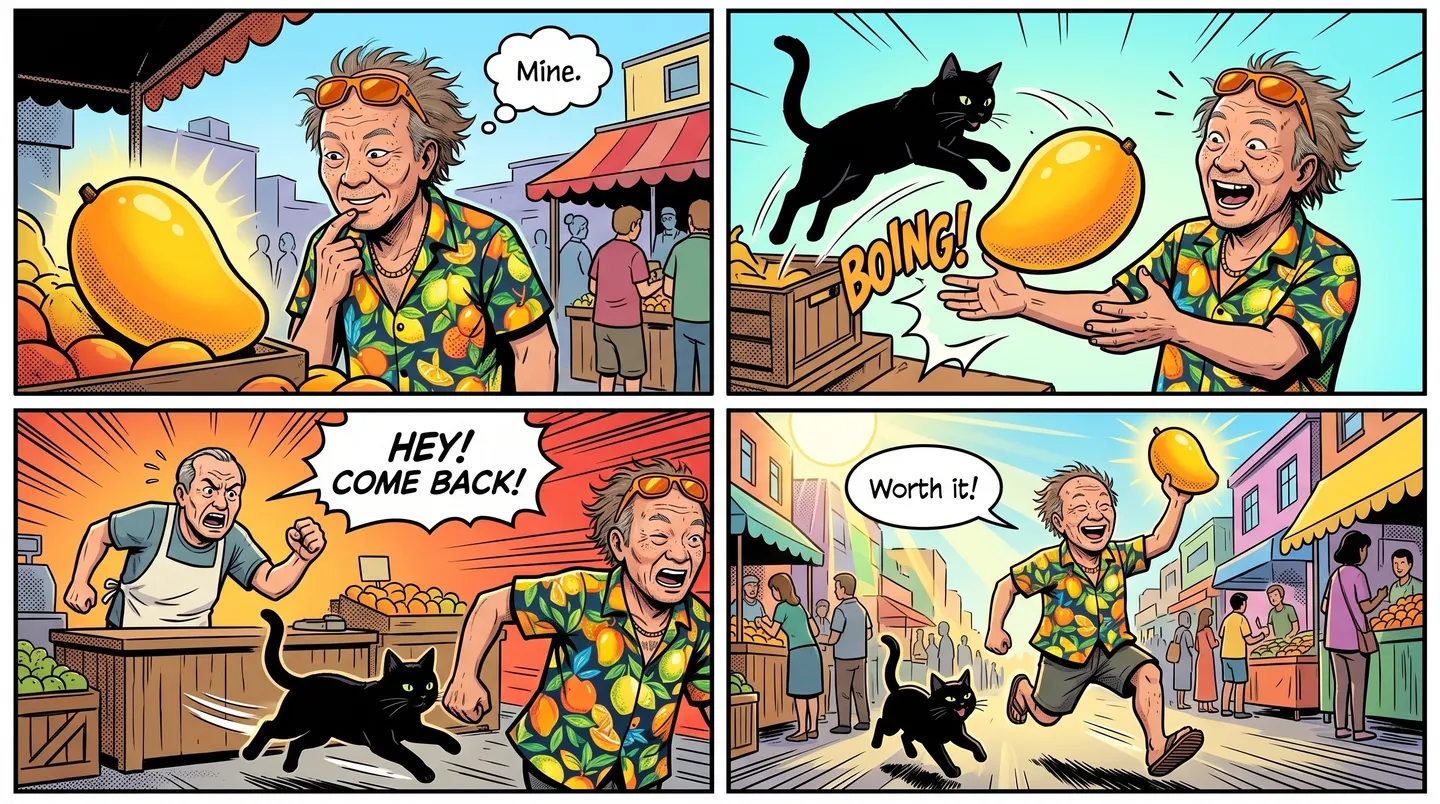
Four-panel comic strip, bold black ink and flat color. Panel 1: @unclewei eyes a pile of mangoes at a market stall. Panel 2: he slips one into his jacket. Panel 3: a black cat on the counter stares at him. Panel 4: he hands the cat the mango, speech bubble: "Our secret, okay?"
Splash page
Full-page splash, retro halftone comic style: a hero in a yellow raincoat leaps between rooftops in a storm, lightning behind her, caption box at the top: "Night three. Still no sign of him."
Webtoon panel
Vertical webtoon panel, soft digital painting: two friends share an umbrella outside a convenience store at night, rain streaks, one small speech bubble: "You came back."
Room to experiment
How Mage compares for making comics
Many comic apps wrap one image model in a panel template. That is quick for a single strip, but a series needs a cast that stays on-model, models that can letter, and room to redo a panel without paying for the page again.
Mainstream tools
- One model for every page
- Characters described again in every prompt
- Each retry spends another credit
- Templates decide the layout
Mage
- GPT Image, Nano Banana and Mango side by side
- Saved characters reused by @handle
- Unlimited plans for the models you use most
- Any panel layout you can describe
Follow your imagination
Who uses an AI comic generator?
Webcomics and webtoons
Run a weekly strip with the same cast, drafted in an evening instead of a week.
Graphic novel pitches
Show an editor sample pages with finished art before you commit to a whole book.
Social storytelling
Turn a thread or a running joke into a four-panel strip people stop scrolling for.
Classrooms and training
Explain a process or a history lesson as a comic with characters students follow.
Start small. Dream big.
Is the AI comic generator free?
Mage is free to start, with a one-time 300-Gem sign-up bonus and every model available on Gems. Unlimited GPT Image at Low quality starts on Basic, and unlimited Mango and character creation start on Pro.
Free
$0
One-time 300 Gems for new members. No watermark.
Basic
$10/mo
Unlimited GPT Image 2 and 2.5 at Low quality, plus Inpainting and Refine. 500 monthly Gems.
Pro
$30/mo
Unlimited Mango and Guava, unlimited character creation, Enhance to 2K. 1,500 monthly Gems.
A little more clarity
Frequently asked questions
What is the best AI comic generator?
Can AI keep the same character across comic panels?
Can the AI write the text in speech bubbles?
Can I make a whole comic book?
Is there a free AI comic generator?
Can I sell comics I make on Mage?
What styles can it draw?

Ready to draw your first page?
Free to start, private by design. Have fun creating!
Make a comic with GPT ImageRelated generators & guides
Mage is for adults, 18+ only. Nothing illegal is allowed; any content involving minors or non-consensual depictions of real people is strictly prohibited.