
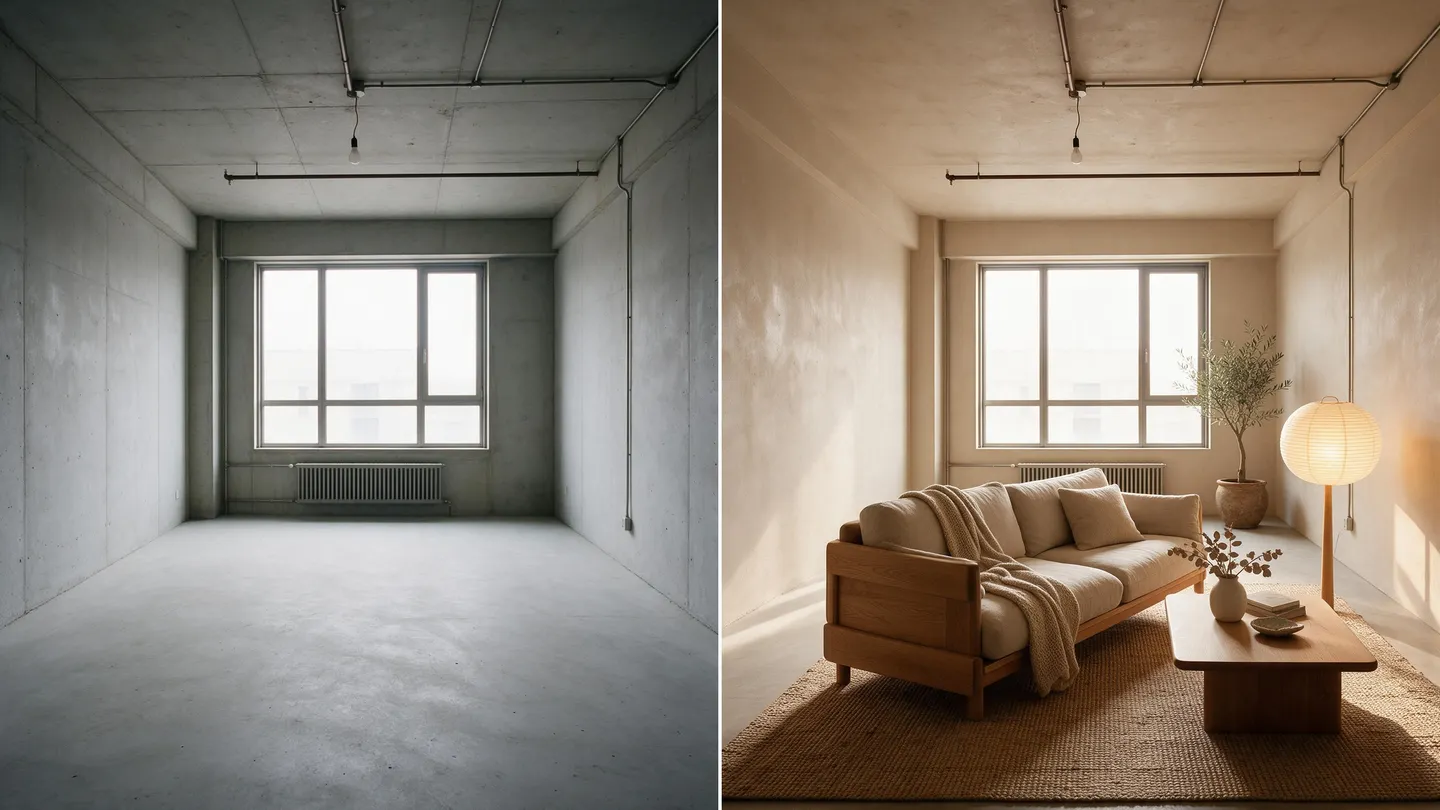
Free to start · Your room, restyled
AI Interior Design Generator
Photograph a room, pick a style, and see it furnished, repainted and relit while the walls, windows and layout stay where they are. Free to start, in your browser.
No installation. No credit card. Private by default.
- Up to 14Reference images on Nano Banana 2.1
- Up to 4KOn Nano Banana 2.1
- Up to 6KWith Image Enhancer
- $0Free to start
The basics
What is an AI interior design generator?
An AI interior design generator takes a photo of a real room and shows it in a new style: different furniture, wall color, flooring, lighting and decor, with the architecture kept the way it is. It is the fastest way to answer "what would this room look like if..." before you buy anything or call a contractor.
On Mage you do it with the image models that edit a photo you attach. Mango 3 makes edits that keep the rest of the image in place, Nano Banana 2.1 edits from up to 14 reference images at up to 4K, and GPT Image 2.5 Flare follows detailed instructions closely. Attach the room, describe the change, and compare the results side by side.
Be clear about what it is: an image restyle for ideas and mood, not a floor plan, a measured drawing or a shopping list. The furniture is invented, sizes are not to scale, and a designer or contractor still has to check what will actually fit.
A little more possibility
Why people restyle rooms on Mage
Start from your real room
Attach a photo and the edit keeps your walls, windows, doors and layout.
Any style in one sentence
Japandi, mid-century, coastal, industrial or maximalist. Change the style line and run it again.
Mood boards as references
Attach a room you love or a fabric swatch next to your photo. Nano Banana 2.1 takes up to 14 references.
See it from another corner
The Angles app renders the same scene from a new camera position.
Day, dusk or lamplight
The Relight app changes the direction and color of the light in a finished image.
Your home stays private
Photos of your home and every result are private by default.
From idea to creation
How do you redesign a room with AI?
It takes three steps, and it is free to start.
Photograph the room
Stand in a corner, hold the phone level, and shoot in daylight with the lights on. Wide and sharp beats artistic.
Attach it and describe the change
Open Mango, pick Mango 3 in the model menu, attach the photo, and say what stays and what changes.
Compare styles and models
Run two or three styles, or the same style on Nano Banana 2.1 and GPT Image 2.5 Flare, and keep the best.
Relight and upscale
Try evening light in Relight, a new viewpoint in Angles, and upscale your favorite with Image Enhancer.
Tips and techniques
How to write a room restyle prompt
Start with what must not move: "Keep the walls, windows, ceiling, floor plan and camera angle exactly as in the photo." Then describe the change in layers: furniture, materials, color, lighting and decor. "Replace the furniture with a low oak sofa, a round travertine coffee table and a wool rug; paint the walls warm white; add linen curtains and a paper floor lamp."
Name a style, then make it specific. "Japandi" alone gives a generic catalog room; "Japandi, light oak, off-white plaster, black steel accents, one large plant" gives a room that looks designed. If you have a reference, attach it and say "match the materials and palette of the second image."
Change one big thing at a time while you are deciding. Repainting and refurnishing in one go makes it hard to tell which change you liked. Run the paint, then the furniture, then the light.
- Always say what stays: walls, windows, layout and camera angle.
- Describe furniture, materials, color and light separately.
- Attach a reference room or a swatch for the palette.
- Change one big element per run while you decide.
- Shoot the room in daylight, from a corner.
Tips and techniques
What it can and cannot do
It is very good at mood: how a room feels in a different palette, with a different sofa, or at dusk. It is good at materials, from wood species to tile patterns. It is not a measuring tool. The models do not know your room's dimensions, so a sofa that looks perfect in the image may not fit through the door.
The furniture in the image is generated, not taken from a catalog, so you will not find the exact pieces in a store. Use the image to brief a designer or to shop for pieces with the same shape and material.
For an empty room, describe the furnishing from scratch while keeping the architecture. To replace a single object, such as one armchair, mask it in Inpaint and describe the new piece; everything outside the mask stays as it was. The AI image editor guide covers masked edits in detail.
The right model for the job
The best models for interior design
All of these take your room photo as an input image.
Mango 3
Edits that keep the rest of the image in place and follow exact instructions, with up to 10 references. The first pick for "keep the room, change the furniture." Unlimited on Pro, up to 2K.
Nano Banana 2.1
Google's model edits from up to 14 reference images at up to 4K, so a mood board can sit beside your photo. Google's safety filter applies.
GPT Image 2.5 Flare
Precise prompt adherence and detailed edits from up to 15 references, at a low price at its default quality. OpenAI's safety filter applies.
Flux 2
An open-weights model for long, detailed prompts and edits from up to three reference images. It is on Basic's unlimited list.
Try these prompts
Room prompts to start from
Attach your room photo first. Each prompt says what stays before what changes.
Japandi living room
Keep the walls, windows, floor plan and camera angle exactly as in the photo. Restyle as a Japandi living room: a low light-oak sofa, a round travertine table, a wool rug, warm white plaster walls, linen curtains and one large olive tree.
Kitchen refresh
Keep the layout, windows and appliances where they are. Change the cabinets to deep green matte with brass handles and the counters to white marble, and add open oak shelves.
Kids' room
Keep the room shape and the window. Turn it into a calm kids' bedroom: a low wooden bed, a reading nook with floor cushions, soft sage walls and paper star lanterns.
Evening mood
Keep everything in the room exactly as it is. Change the time to evening: lamps on, warm pools of light, and blue dusk through the windows.
Room to experiment
How Mage compares for room ideas
Most room-design apps run one model with a fixed list of styles. Mage lets you describe the exact style you want, attach your own references, and compare several frontier models on the same photo.
Mainstream tools
- A fixed menu of styles
- One model behind every result
- No room for your own references
- Credits spent per render
Mage
- Any style, in your own words
- Mango 3, Nano Banana 2.1 and GPT Image on the same photo
- A mood board attached beside your room
- Unlimited Mango from Pro
Follow your imagination
Who uses an AI interior design generator?
Homeowners and renters
See paint, furniture and layout ideas before buying a single thing.
Virtual staging concepts
Show what an empty room could become, clearly labeled as an illustration.
Interior designers
Turn a client brief into three directions in an afternoon.
Hosts and small businesses
Plan a refresh for a rental, a cafe or a studio before spending on it.
Start small. Dream big.
Is the AI interior design generator free?
Mage is free to start with a one-time 300-Gem bonus, and every model runs on Gems. Unlimited Mango starts on Pro, and Nano Banana 2.1 joins the unlimited list at 1K on Pro Plus.
Free
$0
One-time 300 Gems for new members. No watermark.
Basic
$10/mo
Unlimited Flux 2 and GPT Image at Low quality, plus Inpainting and Refine. 500 monthly Gems.
Pro
$30/mo
Unlimited Mango and Guava, Relight and Angles on those models, and Enhance to 2K. 1,500 monthly Gems.
A little more clarity
Frequently asked questions
Can AI redesign my room from a photo?
Is it accurate enough to buy furniture from?
What is the best AI interior design generator?
Can I change just one piece of furniture?
Can I see the room from another angle?
Is it free, and are my photos private?

Ready to see your room in a new style?
Free to start, private by design. Have fun creating!
Restyle a room with MangoRelated generators & guides
Mage is for adults, 18+ only. Nothing illegal is allowed; any content involving minors or non-consensual depictions of real people is strictly prohibited.