
Free to start · Studio shots without the studio
AI Product Photo Generator
Upload a photo of your product and place it in a studio set, a kitchen, a beach or a splash of water, then relight it, re-angle it and upscale it for your store. Free to start.
No installation. No credit card. Private by default.
- Up to 6KWith Image Enhancer
- Up to 10Reference images on Mango 3
- Up to 3Reference images on Guava 2 Pro
- $0Free to start
The basics
What is an AI product photo generator?
An AI product photo generator takes a picture of something you sell and builds the shot around it: a seamless studio backdrop, a styled lifestyle scene, props, light and reflections. Instead of booking a studio for every new colorway or season, you photograph the product once and generate the scenes.
Mage gives you the models that matter for it. Guava 2 Pro is Mage's photorealism model for product shots that pass for photographs, with up to three reference images. Mango 3 combines up to 10 references, so the product, a location and a prop can all go into one image. Then the Relight app changes the light and the Angles app renders the shot from a new camera position.
Know the one real limit before you start: the model redraws your product, so small print on a label can change. Check every detail before you publish, and keep a real photo for anything a customer needs to read.
A little more possibility
Why sellers make product photos on Mage
Your product, a new scene
Attach your product photo and describe the set. The model builds the scene around the product.
Photoreal on Guava 2 Pro
Guava 2 Pro is built for product shots, fashion and close-up texture: glass, fabric, metal and skin.
Many references at once
Mango 3 combines up to 10 reference images, so the product, a prop and a location go into the same shot.
Relight in one step
The Relight app changes the light direction, softness, brightness and color without a reshoot.
More angles from one shot
The Angles app regenerates the same scene from a new elevation and orientation.
Store-ready resolution
Image Enhancer upscales a finished shot to 2K, 4K or 6K for zoomable listings.
From idea to creation
How do you make product photos with AI?
It takes three steps, and it is free to start.
Photograph the product
Shoot it on a plain background in even light. A clean, sharp photo gives the model the most to work from.
Open Guava and attach it
Pick Guava 2 Pro in the model menu, attach the photo, and describe the set, the light and the lens.
Generate a set of options
Run it several times and keep the best. Switch to Mango 3 when you need more than three references.
Relight, re-angle, upscale
Finish in Relight and Angles, upscale with Image Enhancer, and check the label before you publish.
Tips and techniques
Prompting product shots that look photographed
Product photography is a lighting problem, so describe light the way a photographer would: "softbox from the left, rim light from behind, black seamless backdrop" or "hard noon sun, long shadows, terracotta tile." Name the lens too: "100mm macro" for a ring or a watch, "35mm" for a lifestyle table scene. Guava 2 Pro gives a generic studio look when the prompt is vague.
Tell the model what must not change: "keep the bottle shape, the cap and the label exactly as in the reference." Then describe only the scene. The fewer things you ask the model to reinvent, the closer the product stays to your photo.
Use props that explain the product: citrus slices beside a citrus fragrance, coffee beans around a grinder, a towel and steam beside a skincare jar. A prop tells a shopper what the product is for faster than a caption can.
- Name the light source, its direction and its quality.
- Name the lens: macro for small items, 35mm for scenes.
- Say what must stay exactly as in the reference.
- Use 1:1 for marketplaces and 4:5 for social feeds.
- Check the label and logo in every final image.
Tips and techniques
White backgrounds, lifestyle scenes and the limits
Marketplaces often want a plain white background. Mage does not cut products out or export transparent PNGs, so generate the shot on a "pure white seamless background, soft shadow under the product" instead, or keep your original photo for the white listing image and use generated scenes for the rest of the gallery.
For lifestyle shots with a person holding or wearing the product, use Mango 3 with a saved character so the same person appears across the campaign. The AI fashion design generator and virtual try-on guides cover clothing in more depth.
Be careful with fine print. The model redraws the product each time, and small text, ingredient lists and barcodes can change. Nano Banana 2.1 and GPT Image 2.5 Flare render text better than most, but anything legally required on a label should come from a real photo.
The right model for the job
The best models for product photos
Most sellers settle on Guava 2 Pro for hero shots and Mango 3 for scenes with several references.
Guava 2 Pro
Photoreal product, fashion and editorial images with fine texture. Up to three reference images and 2K at most. Name the light and the lens, or the look turns generic. Unlimited on Pro.
Mango 3
Combines up to 10 references, keeps the rest of an image in place when you edit, and follows exact instructions. Unlimited on Pro, up to 2K.
Nano Banana 2.1
Google's model renders readable text and edits from up to 14 reference images, at up to 4K, which helps when packaging text matters. Google's safety filter applies.
GPT Image 2.5 Flare
Precise prompt adherence and text in the image, with up to 15 references, for ad layouts with a headline. OpenAI's safety filter applies.
Try these prompts
Product photo prompts to start from
Attach your product photo, then use one of these as the scene.
Splash shot
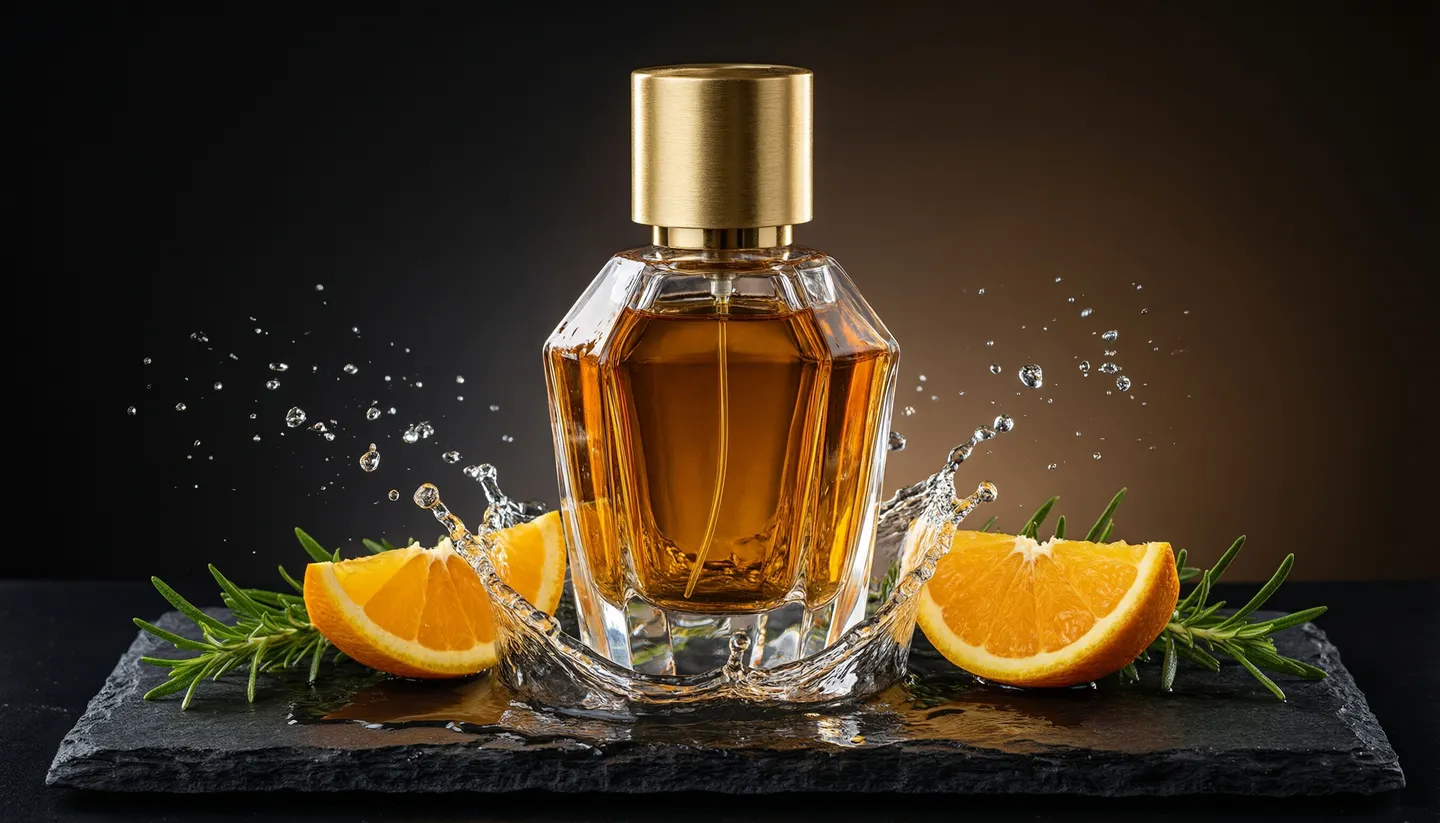
Keep the bottle exactly as in the reference. Amber glass bottle on wet black stone, water splash frozen mid-air, orange slices, hard rim light from behind, 100mm macro, black background.
Lifestyle table
Keep the mug exactly as in the reference. Morning kitchen table by a window, linen napkin, a croissant, soft daylight from the left, 35mm, shallow depth of field.
Marketplace white
Keep the sneaker exactly as in the reference. Pure white seamless background, soft contact shadow, three-quarter view, even softbox lighting.
Seasonal scene
Keep the candle exactly as in the reference. Snowy windowsill at dusk, pine branches, warm string lights out of focus, 85mm.
Room to experiment
Mage vs a product photo shoot
A studio day still makes sense for a flagship launch. For every new colorway, marketplace listing and seasonal refresh in between, generating the scene is faster and lets you try ten sets before you commit to one.
A studio shoot
- Book a studio, a photographer and props
- One set per day
- A reshoot for every new background
- Retouching billed by the image
Mage
- Upload one good product photo
- Generate as many sets as you like
- Relight and re-angle without a reshoot
- Unlimited Guava and Mango from Pro
Follow your imagination
Who uses an AI product photo generator?
Online stores
Fill a product gallery with studio and lifestyle shots from one photo.
Marketplace listings
Make square images on clean backgrounds and zoom-ready detail shots.
Social posts and ads
Seasonal scenes and campaign variations without booking a new shoot.
Launch previews
Show a sample or a 3D render in a real-looking setting before launch.
Start small. Dream big.
Is the AI product photo generator free?
Mage is free to start with a one-time 300-Gem bonus, and every model runs on Gems. Unlimited Guava and Mango start on Pro.
Free
$0
One-time 300 Gems for new members. No watermark.
Pro
$30/mo
Unlimited Guava and Mango, including Relight and Angles on those models, and Enhance to 2K. 1,500 monthly Gems.
Pro Plus
$60/mo
Mango at 3K and 4K, Nano Banana 2.1 at 1K, Enhance to 4K, and up to 10 generations queued at once. 3,500 monthly Gems.
A little more clarity
Frequently asked questions
What is the best AI product photo generator?
Will the AI change my product?
Can I get a white background or a transparent PNG?
How many reference images can I use?
Can I use the images commercially?
Is there a free AI product photo generator?

Ready to shoot without a studio?
Free to start, private by design. Have fun creating!
Shoot products with GuavaRelated generators & guides
Mage is for adults, 18+ only. Nothing illegal is allowed; any content involving minors or non-consensual depictions of real people is strictly prohibited.