
Video model by xAI
Grok Imagine AI video generator
xAI's Grok Imagine for video: clips from text, from reference images, or from a short clip to edit.
No installation. No credit card. Private by default.
At a glance
Grok Imagine is xAI's video model, run by xAI and reached through Mage. On Mage it makes video from a prompt or up to 5 reference images at up to 720p, in clips of 1 to 15 seconds. It costs from 75 Gems (about $0.075) per second and runs unlimited from the Pro Plus plan, and new accounts get 300 free Gems to start.
- 75Gems per second, from
- $0.075About, in US dollars
- Pro PlusUnlimited from
- 720pTop resolution
- 1–15 sClip length
Overview
What is Grok Imagine?
Grok Video is xAI's Grok Imagine for video, run by xAI and reached through Mage.
It makes clips from a prompt or from reference images, edits a short clip you upload, and takes saved Characters and references by @handle.
Samples
Made with Grok Imagine
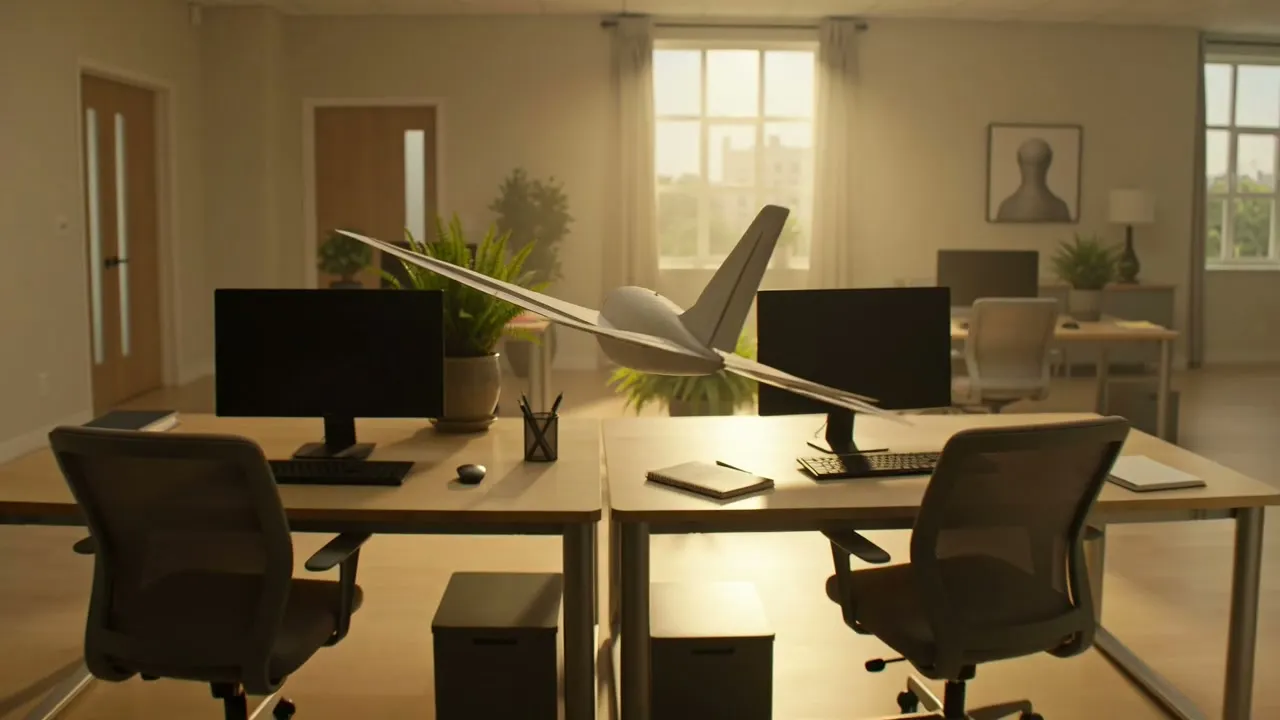
Generated on Mage with Grok Video. A prompt under a sample is the exact prompt that made it.
One continuous tracking shotPrompt: a paper airplane glides through a sunlit open-plan office, weaving between desks and plants, the camera follows it in one smooth tracking shot
Strengths
What Grok Imagine does best
Best at
- Short, lively clips from a plain prompt
- Video from a Character or reference images
- Editing a short clip you upload
- Any clip length within its range, second by second
Trade-offs
- xAI's safety filter applies, and Mage cannot override it
- No first or last frame: its images are references
- Tops out at 720p
Prompt guide
How to prompt Grok Imagine
Tips that work on this model, example prompts to start from, and the exact prompts behind the samples above.
Tips
- Describe one continuous shot and how the camera follows the subject.
- Mention a saved Character by @handle to put them in the clip.
- Short clips cost less: find the motion at a few seconds, then go longer.
- To edit, upload the clip and say what changes in it.
Example prompts
Character on the move
@yourcharacter walks through a night market, neon signs, handheld cameraWeather moment
a summer storm rolls over a wheat field, wind bending the stalks in waves, lightning on the horizon
Specs
Grok Imagine specs and inputs
| Made by | xAI, reached through Mage |
|---|---|
| Output | Video |
| Resolutions | 480p, 720p |
| Clip lengths | 1 to 15 seconds |
| Aspect ratios | 1:1, 16:9, 9:16, 4:3, 3:4, 3:2, 2:3 |
| Image inputs | Up to 5 reference images |
| Video input | Yes |
| Mentions by @handle | Characters and references |
| Character voices | No |
| Where to use it | The Mage app, the Mage assistant, Claude and ChatGPT through the Mage MCP server, and the Mage API |
Pricing
Grok Imagine price and plans
Every price comes from the same pricing that bills your generations.
| Model | Setting | Gems | Per | USD | Basic | Pro | Pro Plus | Max |
|---|---|---|---|---|---|---|---|---|
| Grok Video | 480p | 75 | second | $0.075 | Gems | Gems | Unlimited up to 5 s | Unlimited up to 7 s |
| Grok Video | 720p | 105 | second | $0.105 | Gems | Gems | Unlimited up to 3 s | Unlimited up to 5 s |
Prices in Gems, and in US dollars at the list price of the 10,000 Gems pack ($10). Each plan column shows what that plan runs unlimited, up to the longest length it covers; anything else costs Gems. Other settings, such as quality levels and extra input images, can change the price.
FAQ
Grok Imagine questions
How much does Grok Imagine cost?
Can I use Grok Imagine unlimited?
Can I try Grok Imagine for free?
What can I give Grok Imagine as input?
What resolutions and lengths does Grok Imagine support?
Can I use Grok Imagine through an API, or in Claude and ChatGPT?
Is what I make with Grok Imagine private?
Compare
More AI video models on Mage
Kiwi
Everyday video from text or a single start frame, with nothing else to set up.
Lemon
Every video feature at a friendlier price: frames, references, voices, audio, and clips from short loops to long scenes.
LTX Video
A fast open-weights video model for cheap, rapid iteration.
Melon
Mage's anime video model, from frames or Characters, with optional audio.
MiniMax-H3
A fast open video model that generates the picture and stereo sound together.
Plum Max
Full-feature video with generated sound on every clip, from frames or from your Characters and references.

Make your first video with Grok Imagine
New accounts get 300 free Gems, enough to try Grok Video. No install, no credit card.
Start creating for free