
Mage video model · Only on Mage
Raspberry AI video generator
Characters brought to life from a first frame and your references, speaking in their own voices.
No installation. No credit card. Private by default.
At a glance
Raspberry is one of Mage's own video models, available only on Mage. On Mage it makes video from a prompt, a first frame, or up to 5 reference images at up to 1080p, in clips of 2 to 15 seconds. It costs from 90 Gems (about $0.09) per second and runs unlimited from the Pro Plus plan, and new accounts get 300 free Gems to start.
- 90Gems per second, from
- $0.09About, in US dollars
- Pro PlusUnlimited from
- 1080pTop resolution
- 2–15 sClip length
Overview
What is Raspberry?
Raspberry is Mage's character video model, available only on Mage. It carries a saved Character into video, in the Character's own voice, from a first frame and reference images.
It is the model for short scenes where one person has to look and sound right.
Samples
Made with Raspberry
Generated on Mage with Raspberry.
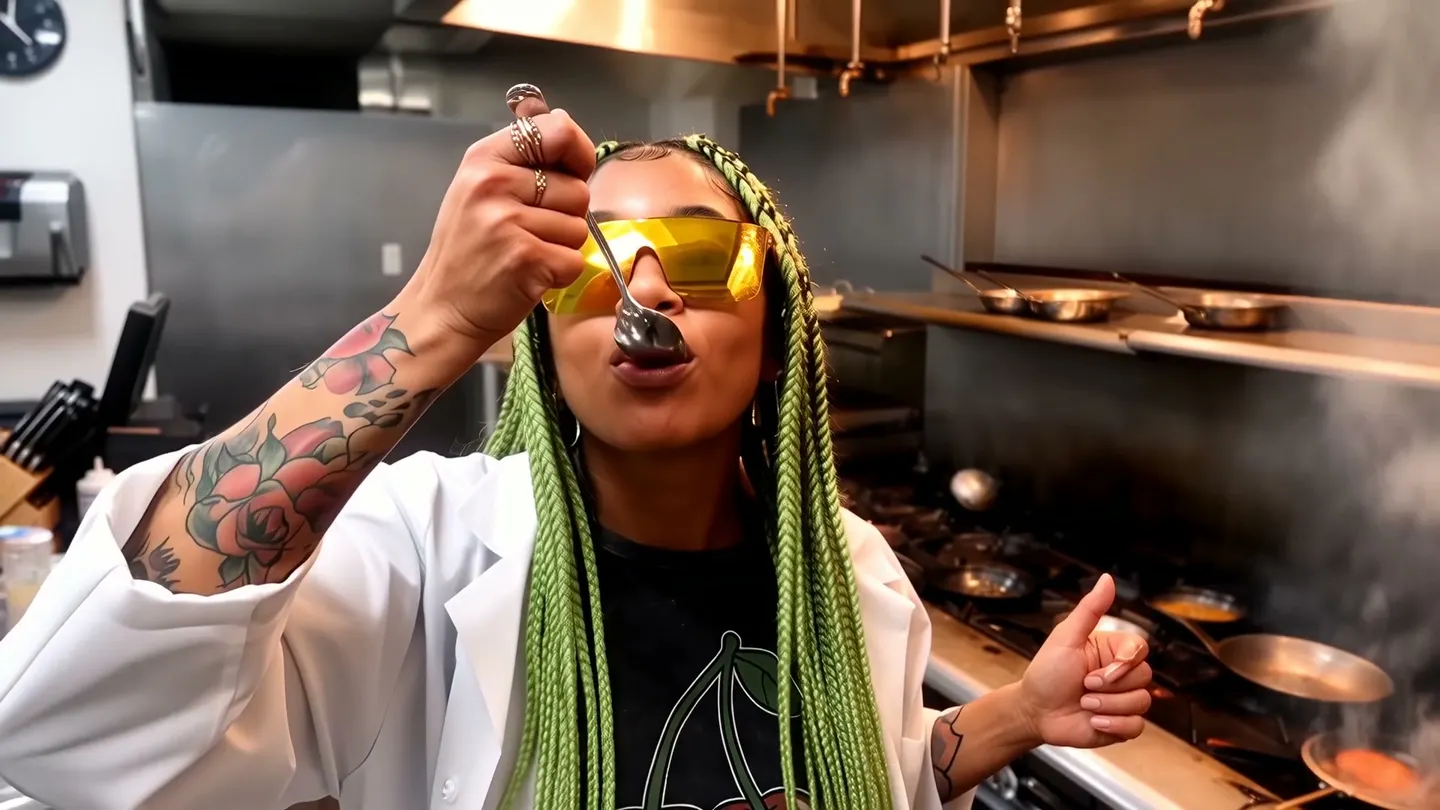
A member of the Mage cast tastes a sauce in a busy kitchen and gives a thumbs up
Strengths
What Raspberry does best
Best at
- A saved Character carried into video with its own voice
- Short talking and reaction shots
- Scenes built on a first frame plus references
- Social clips with one clear performer
Trade-offs
- No last frame
- Fewer references than Cherry 2 Pro or Lemon
Prompt guide
How to prompt Raspberry
Tips that work on this model, then example prompts to start from.
Tips
- Start the prompt with the Character's @handle and what they do.
- Give them a line in quotes if they should speak; their saved voice says it.
- Use a first frame to fix the opening pose and setting.
- One performer, one action, one camera move per clip.
Example prompts
Chef reaction shot
@yourcharacter tastes a sauce in a busy restaurant kitchen, grins and gives the camera a thumbs up, flames and steam behind them, handheld cameraA spoken line
@yourcharacter looks up from a laptop in a sunny cafe and says: "It works. It actually works." Slow push-in.From a first frame
the person in the picture turns toward the camera, laughs, and waves, wind in their hair, beach at sunset
Specs
Raspberry specs and inputs
| Made by | Mage, available only on Mage |
|---|---|
| Output | Video |
| Resolutions | 720p, 1080p |
| Clip lengths | 2 to 15 seconds |
| Aspect ratios | 16:9, 4:3, 1:1, 3:4, 9:16 |
| Image inputs | A first frame, or up to 5 reference images |
| Video input | No |
| Mentions by @handle | Characters and references |
| Character voices | Yes |
| Where to use it | The Mage app, the Mage assistant, Claude and ChatGPT through the Mage MCP server, and the Mage API |
Pricing
Raspberry price and plans
Every price comes from the same pricing that bills your generations.
| Model | Setting | Gems | Per | USD | Basic | Pro | Pro Plus | Max |
|---|---|---|---|---|---|---|---|---|
| Raspberry | 720p | 90 | second | $0.09 | Gems | Gems | Unlimited up to 4 s | Unlimited up to 6 s |
| Raspberry | 1080p | 135 | second | $0.135 | Gems | Gems | Unlimited up to 2 s | Unlimited up to 4 s |
Prices in Gems, and in US dollars at the list price of the 10,000 Gems pack ($10). Each plan column shows what that plan runs unlimited, up to the longest length it covers; anything else costs Gems. Other settings, such as quality levels and extra input images, can change the price.
FAQ
Raspberry questions
How much does Raspberry cost?
Can I use Raspberry unlimited?
Can I try Raspberry for free?
What can I give Raspberry as input?
What resolutions and lengths does Raspberry support?
Can I use Raspberry through an API, or in Claude and ChatGPT?
Is what I make with Raspberry private?
Compare
More AI video models on Mage
Wan 2.2
Open-weights video from text or a start frame, with a faster Lightning variant.
Berry 2
Video that stays faithful to every reference you give it.
Blueberry 2
Pin the first and the last frame, and it fills in the motion between, with audio.
Cherry 2 Pro
Mage's flagship video model: cinematic motion with sound, characters who keep their face and voice, and edits of your own clips.
Grok Imagine
xAI's Grok Imagine for video: clips from text, from reference images, or from a short clip to edit.
Kiwi
Everyday video from text or a single start frame, with nothing else to set up.

Make your first video with Raspberry
New accounts get 300 free Gems, enough to try Raspberry. No install, no credit card.
Start creating for free