
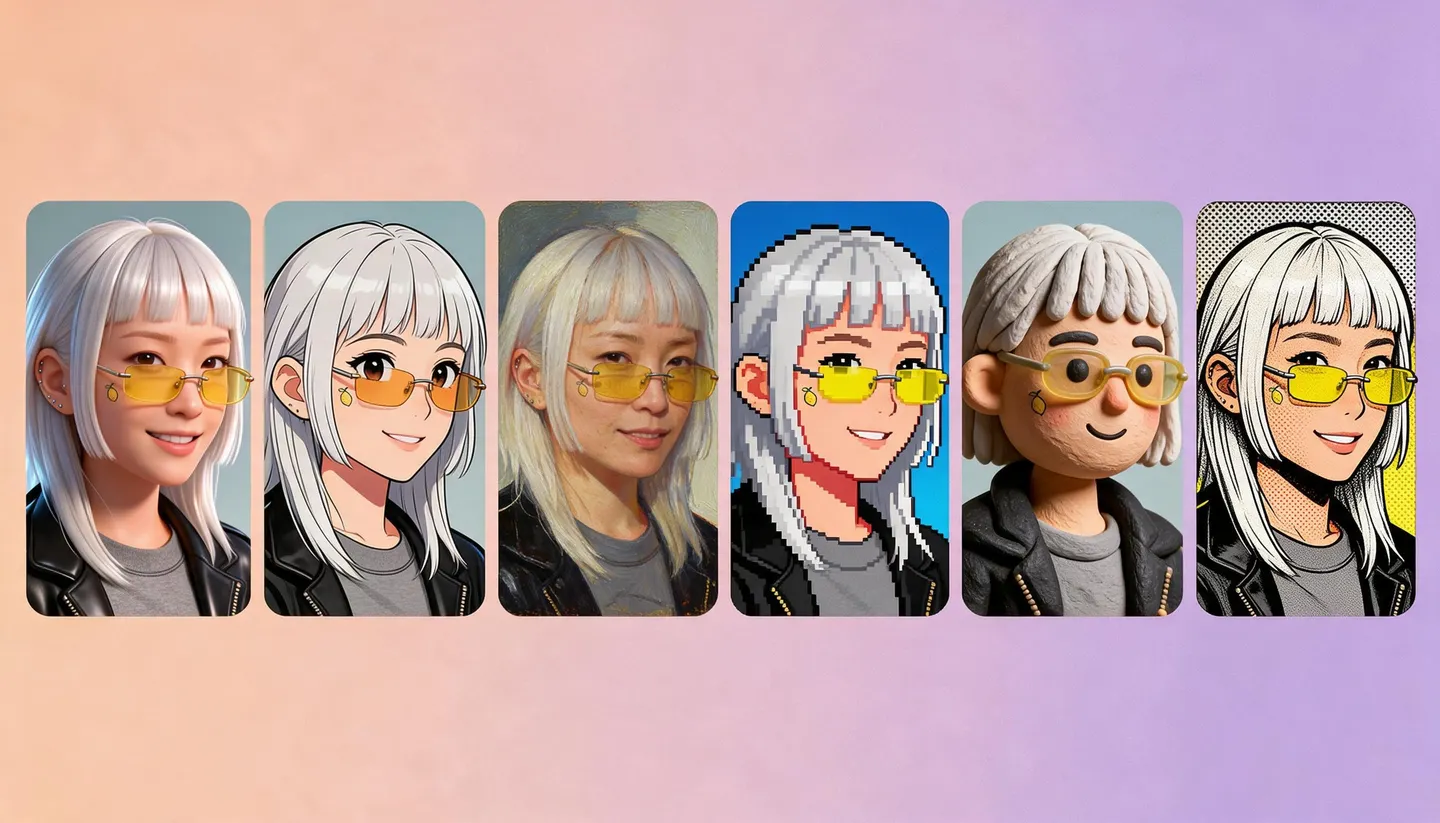
Free to start · Any style, one face
AI Avatar Generator
Make a profile picture that looks like you, or like the character you want to be, in 3D cartoon, anime, pixel art, oil paint or comic ink. Keep the same face across every style and every platform.
No installation. No credit card. Private by default.
- 160+AI models
- 1:1Square for profiles
- 10Reference images on Mango 3
- $0Free to start
The basics
What is an AI avatar generator?
An AI avatar generator makes a picture that stands for you online: a profile photo, a gaming icon, a forum badge or a streaming persona. It can be a stylized version of your real face, an invented character, or a mascot, drawn in whatever style suits the platform.
Mage does this with the same models it uses for full illustrations. Mango 3 restyles a photo or draws from a prompt and keeps a character consistent, Anima draws clean anime avatars from text, and Nano Banana 2.1 and GPT Image 2.5 Flare follow detailed style instructions with many reference images.
The part most avatar apps skip is consistency. Save your avatar once as a character and every new version, whether a holiday outfit, a new expression or a whole new style, keeps the same face. That matters when the same persona appears on five platforms.
A little more possibility
Why creators make avatars on Mage
Any style you can name
3D cartoon, anime, pixel art, claymation, watercolor, comic ink or photoreal, from one prompt box.
One face, every version
Save the avatar as a character and mention its @handle, so each new outfit or expression stays on-model.
From your photo or from scratch
Attach a photo of yourself to restyle it, or describe an invented persona and build it from words.
Square and banner formats
Make a 1:1 profile picture, then a 21:9 or 16:9 banner of the same character for the header.
Private by default
Your photos and avatars stay in your account until you decide to post one.
No watermark
Download the original file, ready to upload as your profile picture anywhere.
From idea to creation
How do you make an AI avatar?
It takes three steps, and it is free to start.
Open the generator
Use the button on this page to open Mango in your browser, then pick Mango 3 in the model menu.
Add a photo or describe the persona
Attach a clear photo of yourself to restyle, or describe the character you want from scratch.
Name the style and set 1:1
Write the style, the framing and the background, choose a square aspect ratio, and generate.
Save it as a character
Save the avatar you like as a character, so every new version keeps the same face.
Tips and techniques
Pick a style that reads at a small size
Avatars are seen at the size of a thumbnail, so the style has to survive being tiny. Bold shapes, a clear silhouette, a simple background and strong contrast between the face and what is behind it all help. Busy scenes and fine detail disappear at profile-picture size.
Some styles that work well: a 3D animated-film look with soft shading, flat vector illustration with a solid color background, anime with clean line art, 16-bit pixel art, claymation, and a painted portrait on a plain backdrop. Name the style first in the prompt, then the person, then the background color.
- Head and shoulders, centered, facing the camera
- One solid or gradient background color
- Strong contrast between the face and the backdrop
- Name the style in the first few words of the prompt
- Generate a few and compare them at thumbnail size
Tips and techniques
Turn your photo into an avatar
To make an avatar that looks like you, attach a clear photo of your face to Mango 3 and ask for the style: "turn this person into a 3D cartoon avatar, head and shoulders, teal background." Mango keeps the rest of the instruction in place while it restyles. For anime in particular, the photo to anime guide covers the details.
Use only your own photo, or a photo of someone who asked you to make their avatar. Mage does not allow non-consensual imagery of real people.
Tips and techniques
Keep one persona across platforms
Once you have the avatar, save it as a character from that one image. Its @handle then works in any prompt on Mango, Guava, Nano Banana or GPT Image, so you can make a seasonal version, a reaction pack, a banner and a full-body shot without the face drifting. Character Sheet turns one avatar image into front, side and back views, and the AI character generator explains the whole system.
The right model for the job
The best AI models for avatars
Pick the model for the style, then keep the face with a saved character.
Mango 3
The all-rounder: restyles a photo into almost any look, follows exact instructions, and keeps a saved character consistent across a set.
Mango 3 Turbo
The fastest, cheapest Mango, with characters and references. Good for trying many styles before you settle on one.
Anima
Clean anime line art and flat color from a prompt with Danbooru-style tags. It takes no input image, so use it for invented anime personas.
GPT Image 2.5 Flare
OpenAI's model, with precise prompt adherence and many reference images; good when the avatar needs a name or a short word in it. OpenAI's safety filter applies.
Try these prompts
Avatar prompts to start from
Use one as written for an invented persona, or attach your photo and keep the style part.
3D cartoon
Head-and-shoulders avatar in a soft 3D animated-film style, big friendly smile, round glasses, solid teal background, centered
Pixel art
16-bit pixel art avatar of a skater with a green beanie, limited palette, crisp square pixels, solid purple background
Painted
Avatar portrait in loose gouache, warm orange background, bold brush strokes, calm expression, head and shoulders
Anime persona
1boy, messy black hair, headphones around neck, slight smile, upper body, plain light blue background, clean lineart
Room to experiment
Mage compared with one-tap avatar packs
Avatar packs give you a fixed set of styles and a batch of images. Mage gives you any style you can describe, and a saved character that keeps the same face for as long as you use it.
Mainstream tools
- A fixed menu of styles
- A new face in every pack
- Little control over the details
Mage
- Any style you can describe
- A saved character keeps one face
- Change one detail and run it again
- Private by default, no watermark
Follow your imagination
Where people use AI avatars
Social and forum profiles
A distinctive square picture that reads clearly at thumbnail size.
Gaming and streaming
A persona for a gaming handle or a channel, with matching banners and emotes.
Privacy-minded profiles
A stylized avatar instead of a real photo for places you would rather not show your face.
Brand mascots
A character that speaks for a small project or community, consistent across every post.
Start small. Dream big.
Is the AI avatar generator free?
Mage is free to start, and every model runs on Gems on any plan. Unlimited GPT Image at Low quality begins on Basic; unlimited Mango and character creation begin on Pro.
Free
$0
One-time 300 Gems for new members. No watermark.
Basic
$10/mo
Unlimited generation on base models, including GPT Image 2 and 2.5 at Low quality, 500 monthly Gems.
Pro
$30/mo
Unlimited Mango, Anima and Guava, unlimited character creation, 1,500 monthly Gems.
A little more clarity
Frequently asked questions
Can I make an AI avatar from my photo?
How do I keep my avatar consistent?
Is the AI avatar generator free?
What size should a profile picture be?
Can I make an anime avatar?
Are my avatars private?

Ready to make your avatar?
Free to start, private by design. Have fun creating!
Open the Mango generatorRelated generators & guides
Mage is for adults, 18+ only. Nothing illegal is allowed; any content involving minors or non-consensual depictions of real people is strictly prohibited.