
Free to start · Cut, color and style
AI Hairstyle Changer
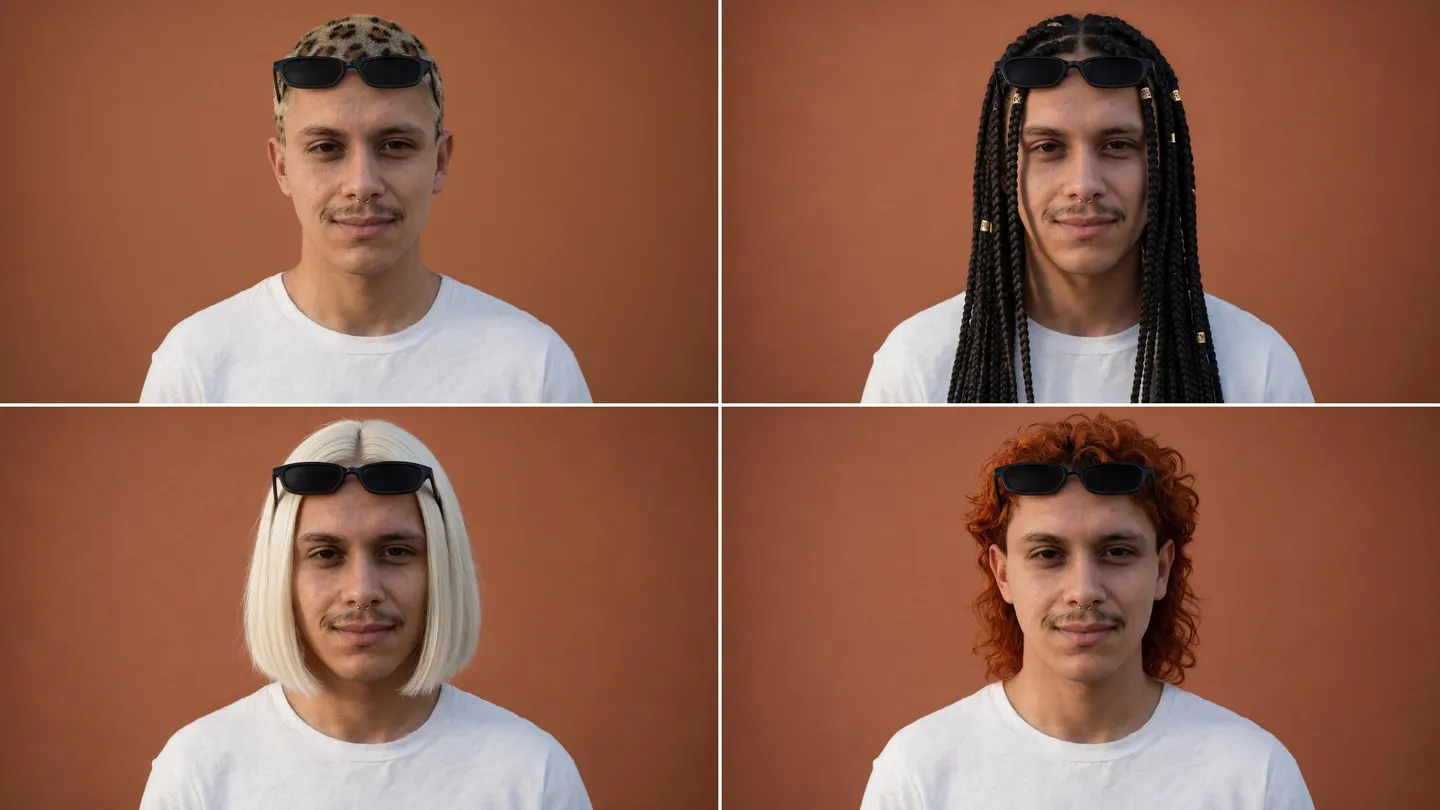
See the cut before the salon does. Paint over your hair, describe the new length, shape and color, and Mage repaints only the hair while your face, your expression and the background stay put.
No installation. No credit card. Private by default.
- 2Ways: mask or describe
- Cut + colorIn one edit or separately
- 0Watermarks
- $0Free to start
The basics
What is an AI hairstyle changer?
An AI hairstyle changer shows you, or a character, with different hair in a photo you already have. You choose the cut, the length, the texture and the color, and the model repaints the hair so it sits on the head, falls on the shoulders and catches the light the way real hair would.
Mage does this two ways. In Inpaint, you paint a mask over the hair and describe the new style, and only the masked area changes, so the face cannot drift. In the prompt bar, you attach the photo to an edit model such as Mango 3 and describe the change in words, which is quicker when you want to try many styles in a row.
Both keep the person recognizably the same. A good hairstyle edit changes the hair and nothing else: not the face, not the expression, not the clothes. When you want to change the whole face instead, that is a face swap.
A little more possibility
Why people try hairstyles on Mage
Only the hair changes
Inpaint repaints just the area you mask, so your face and the background are left exactly as they were.
Cut, color and texture
Describe length, shape, parting, bangs, curl and shade, from a sleek bob to long box braids.
Fast trial and error
Inpaint starts on Mango 3 Turbo, quick enough to try a dozen styles in a sitting.
Photoreal hair
Switch Inpaint to Guava 2 Pro when strands, shine and texture need to hold up close.
Works on characters too
Give a saved character a new look for the next chapter while keeping the same face.
Private by default
Your photos and results stay private to your account unless you choose to share them.
From idea to creation
How do you change your hairstyle in a photo with AI?
It takes three steps, and it is free to start.
Upload your photo
Open Inpaint and add a clear photo with your hair and face visible.
Paint over the hair
Mask the hair, plus the area where the new style will fall, such as your shoulders for longer hair.
Describe the new style
Write the cut, length, texture and color, generate, and try another model if it does not look natural.
Tips and techniques
Two ways to change a hairstyle
Inpaint is the precise way. You decide exactly which pixels may change, which is why it is the safer choice for your own face: nothing outside the mask moves. It asks you to confirm you have permission to use the photo before it generates, which matters when the photo is of someone else.
The prompt bar is the quick way. Pick Mango 3 in the model menu, attach the photo, and write the change: "Change only her hair to a chin-length platinum bob; keep her face, expression, clothes and background." Mango 3 is built for edits that keep the rest of the image in place, and Nano Banana 2.1 is a good second opinion. Use this route to try many styles fast, then go to Inpaint for the final version.
Tips and techniques
Masking hair so the result looks real
Mask generously. Include the whole of your current hair and a margin around it, because a mask that stops exactly at the hairline leaves stray strands of the old style. For a longer style, extend the mask down over the neck and shoulders where the new hair will fall. For a shorter style, mask all of the old hair so the model can replace it with neck, collar and background.
Leave the face out of the mask. The forehead, eyes and ears that the new style will cover can be included, but the more of the face you leave unmasked, the more surely it stays yours.
- Mask all of the current hair plus a margin
- Extend the mask over the shoulders for longer styles
- Mask the old hair fully when going shorter
- Keep the eyes, nose and mouth out of the mask
Tips and techniques
Describing the cut and the color
Hairdressers have a precise vocabulary, and the model understands it. Name the length (chin-length, shoulder-length, waist-length), the shape (blunt bob, shag, layered, undercut), the texture (pin-straight, loose waves, tight coils), the parting and the bangs, then the color as a shade rather than a word like "blonde": honey, ash, platinum, copper, espresso.
Try color and cut separately when you are undecided: keep your current cut and change only the shade, then the other way round. If the new hair looks lit differently from your face, run the result through Relight, or see the AI photo editor guide for finishing touches.
- Length: chin, shoulder, mid-back, waist
- Shape: blunt bob, shag, pixie, layers, undercut
- Texture: straight, loose waves, curls, coils, braids
- Color as a shade: honey, ash, platinum, copper, espresso
The right model for the job
The best models for changing hairstyles
Inpaint lets you choose the model that repaints the hair; the prompt bar lets you edit with any of them.
Mango 3 Turbo
The Inpaint default: fast and inexpensive, the one for trying many styles.
Mango 3
The flagship for prompt edits that change only what you ask and keep the rest in place.
Guava 2 Pro
Photoreal hair texture, shine and strands, available in Inpaint. Up to 2K.
Nano Banana 2.1
Google's edit model, with output up to 4K. Google's safety filter applies.
Try these prompts
Hairstyle prompts to try
In Inpaint, describe only the hair. In the prompt bar, also say what must stay the same.
Sleek bob
Chin-length blunt platinum bob, sleek and straight, center part
Long braids
Waist-length knotless box braids, dark brown with honey ends
Curly shag
Shoulder-length curly shag with curtain bangs, copper red
Prompt bar edit
Change only his hair to a short textured crop with a fade; keep his face, expression, shirt and background
Room to experiment
Filter apps vs an AI hairstyle changer
Camera filters lay a fixed hairstyle over your head. A model-based edit repaints your hair into the photo, with the length, the color and the light you ask for.
Hairstyle filters
- A short menu of preset styles
- Hair laid on top, often with a visible edge
- Little control over length and shade
Mage
- Any cut and color you can describe
- Hair repainted into the photo and its light
- Masking keeps the face exactly as it was
- Switch models and compare
Follow your imagination
What can you use an AI hairstyle changer for?
Before the salon
Show your hairdresser exactly what you mean, on your own face.
Testing a color
See copper, ash or platinum on you before you commit to a dye.
Character design
Give a character a new look for a time skip or a costume while keeping the same face.
Stylists and salons
Show clients options on their own photo, with their permission.
Start small. Dream big.
Is the AI hairstyle changer free?
Mage is free to start, and every model can be run with Gems on any plan. Unlimited Inpaint edits on the Mango models begin on Pro at $30 a month.
Free
$0
One-time 300 Gems for new members. No watermark.
Basic
$10/mo
Unlimited generation on the base models, including GPT Image 2 and 2.5 at Low quality, Inpainting and Refine, 500 monthly Gems.
Pro
$30/mo
Unlimited Mango and Guava at 1K and 2K, unlimited character creation, 1,500 monthly Gems.
A little more clarity
Frequently asked questions
Can I try different hairstyles on my own photo?
Will my face change?
Can I try a hair color without changing the cut?
Why does the new hair look pasted on?
Is it free to use?
Can I change the hair of someone else in a photo?

Ready to see the new look?
Free to start, private by design. Have fun creating!
Change a hairstyle in InpaintRelated generators & guides
Mage is for adults, 18+ only. Nothing illegal is allowed; any content involving minors or non-consensual depictions of real people is strictly prohibited.