
Free to start · Vertical, scripted, with sound
AI UGC Video Generator
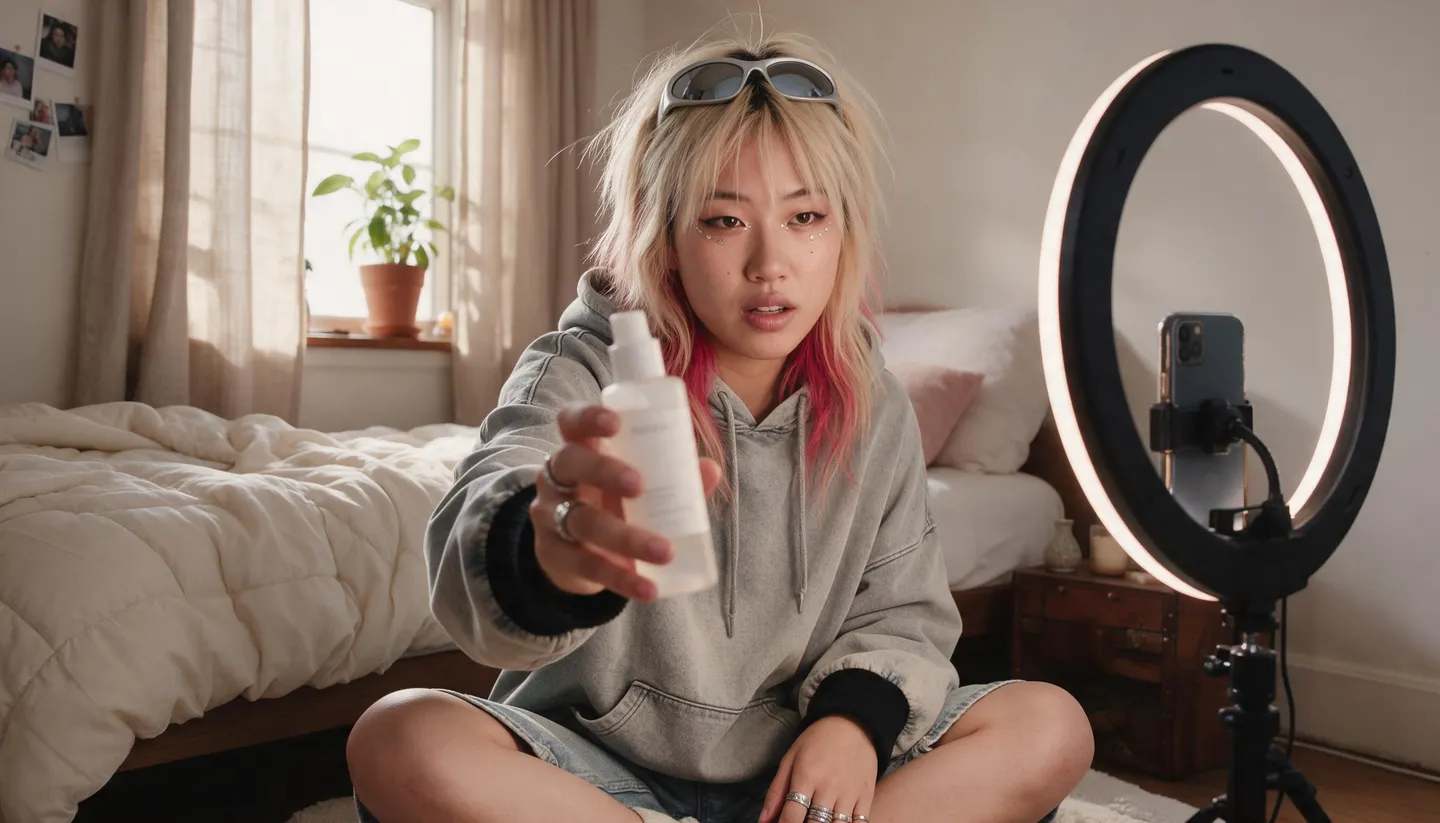
Write the hook and the lines, attach your product photo, and get a vertical clip of a creator holding it and saying them to a phone camera. No samples to ship and no footage to wait for. Free to start.
No installation. No credit card. Private by default.
- 30 sLongest Cherry 2 Pro clip
- 20–25Spoken words in 10 seconds
- 6UGC formats in the skill
- $0Free to start
The basics
What is an AI UGC video generator?
UGC, short for user-generated content, is the style of ad that looks like a person filmed it on their phone: a creator at a bathroom counter or in a kitchen, holding the product up to the camera, talking the way people talk. Brands use it because it reads as a recommendation rather than a commercial. An AI UGC video generator makes that clip without the creator, the shipping or the reshoot.
On Mage the whole clip comes from one model. Cherry 2 Pro generates the picture and the voice together, so the creator says your lines word for word while holding your product, which it takes from your photo as a reference. You can describe the creator in a sentence or cast a saved character with their own voice, so the same person fronts a whole series of ads.
This page is about product ads with a scripted presenter. A virtual person who posts a feed of their own over months is an AI influencer, and a portrait that speaks a recording you already have is a talking photo. Both have their own guides, linked further down this page.
A little more possibility
Why brands make UGC videos on Mage
Your script, spoken
Put the lines in quotes and Cherry 2 Pro generates the voice with the video, so the creator says exactly what you wrote.
Your product in hand
Attach the product photo as a reference and the creator holds that product, label toward the camera.
One creator, many ads
Cast a saved character with a voice, and they look and sound the same in every video you make.
Preview a frame first
Approve a Mango 3 still of the opening frame, which costs a fraction of the video, before you render.
Built vertical
9:16 from 480p to 1080p and from 4 to 30 seconds, ready for Reels, Shorts and TikTok.
Private by default
Drafts and finals stay in your account, with no watermark and a commercial license on paid plans.
From idea to creation
How do you make a UGC video with AI?
It takes three steps, and it is free to start.
Write the script
A hook in the first two seconds, one or two lines about the product, and a short call to action. About 20 to 25 words fill 10 seconds.
Make the opening frame
In Mango 3, attach the product photo and describe the creator, the room and a phone-camera look, at 9:16.
Render on Cherry 2 Pro
Attach the frame and the product photo, describe the actions, quote the lines, and choose 10 or 15 seconds at 720p.
Check and test
Watch it with sound: the label, the lines, the hands. Then write a second hook and render it to test against the first.
Tips and techniques
Writing a UGC script that sounds like a person
People speak about two and a half words a second on camera, so budget the script by the clip: 20 to 25 words for 10 seconds, 35 to 40 for 15 seconds, and 50 to 75 for a 20 to 30 second clip. Leave half a second of quiet at each end. A script that runs long gets rushed or cut off, which is the most common reason a UGC clip feels off.
Spend the first two seconds on the hook. A few patterns work across categories: surprise ("Okay, I didn’t expect this to actually work"), a callout ("If your skin gets dry by noon, stop scrolling"), a confession ("I’ve been gatekeeping this for months"), a question, or an unboxing ("It’s here. Let’s open it."). Follow it with one concrete detail shown on camera, and close with a call to action of a few words.
Write casually. "Honestly," "okay" and small pauses read as real, while marketing phrases read as an ad. Every claim about the product, how it feels, smells, fits or works, should come from your own product facts. A presenter can describe what the product is; they should never claim results, awards or reviews it does not have.
- Budget about 2.5 spoken words per second.
- Put the hook in the first two seconds.
- One gesture per beat: hold up, tap, open, apply, turn.
- End on a call to action of a few words.
- Write two hooks for every script and test them.
Tips and techniques
Six formats that work
Pick the format before you write. A review goes hook, what it is, one standout detail on camera, verdict, call to action. An unboxing goes box in hand, opening reaction, product reveal, first impression. A how-to walks through two or three steps of use and shows the result. A try-on goes from before, to putting it on, to a turn that shows the fit. A routine places the product in a morning or evening routine and says why it stays. A problem–solution opens on a relatable problem, brings in the product as the fix, and shows the proof on camera.
The setting does half the work. Real rooms read as UGC: a bathroom counter, a kitchen, a bedroom, a parked car. Ask for a handheld smartphone front camera at arm’s length, natural window light and a lived-in background, and add "not a studio ad." Then add "no music": UGC usually runs on voice and room tone.
Tips and techniques
Casting a creator who comes back
Describe the creator in one line, their age range, look and energy, or cast one you have saved. A saved character keeps the same face across every clip, and when you give the character a voice, an uploaded MP3 or WAV or a short sample made with Seed Audio, Cherry 2 Pro speaks their lines in it automatically. Build one in Characters or with the AI character generator.
A recurring presenter is not the same job as a virtual influencer with a feed of their own; for that, see the AI influencer generator. Use a real person’s face or voice only with their permission: Mage does not allow harmful deepfakes or non-consensual depictions of real people.
Tips and techniques
Prompting the clip on Cherry 2 Pro
Cherry 2 Pro uses images as references rather than as a first frame, so attach the approved opening frame and the product photo, and say which is which. A structure that works: "Handheld vertical smartphone video, UGC style. The woman in the first reference image talks to the camera at her bathroom counter, holds up the bottle from the second reference image, taps the cap and turns it to show the label. She says: … Natural voice, casual delivery, room tone, no music. Keep the product identical to the second reference image: shape, colors, label."
Render drafts at 480p and finals at 720p. 1080p costs more, and most vertical ads are watched on a phone. Lemon makes a cheaper cut: use the opening frame as Lemon’s first frame, turn audio on, and describe the product in words, because a Lemon clip uses either frames or reference images, not both.
Already have a voice line and a portrait? Lipsync animates one image to speak up to 15 seconds of audio, and the AI talking photo guide shows how to write the voice first.
- Say which reference is the creator and which is the product.
- List the actions in the order they happen.
- Quote every spoken line.
- Draft at 480p, render the keeper at 720p.
Tips and techniques
Let your assistant run the whole job
The free UGC Video skill runs the steps above inside Claude, Cursor or another assistant connected to Mage. You share a link to the product photo and two or three talking points, and pick a format and a creator. The skill writes the script, previews the opening frame with Mango 3 for a few Gems, quotes the video price and waits for a yes, then renders on Cherry 2 Pro, or Lemon for a cheaper cut, and checks that the product matches. Connect Mage and add it from the Mage skills page.
Be open about what the video is. A UGC ad made with AI shows a presenter, not a customer, so do not present it as a genuine review. Platforms such as YouTube ask creators to disclose realistic AI-generated content, and ad platforms have their own labeling rules, so check them before a campaign. For ads beyond the creator format, see the AI ad generator.
The right model for the job
The best models for UGC videos
Mango 3 or Guava 2 Pro makes the opening frame, and a video model makes the creator move and speak.
Cherry 2 Pro
Generates the creator’s voice with the picture, speaks quoted lines, and holds a product from reference images. Up to 30 seconds at 1080p, in 9:16, 16:9 or 1:1.
Mango 3
The opening frame: the creator, the room and your product from its photo. Cheap to redo until it looks right.
Guava 2 Pro
An alternative for the frame when skin and fabric must pass for a photograph. Up to three reference images.
Lemon
A cheaper cut, from the opening frame as a first frame, with generated audio and clips of 2 to 30 seconds.
Try these prompts
UGC prompts to start from
Each one is a Cherry 2 Pro prompt. Attach the opening frame and the product photo, and replace the lines with your own product facts.
Review, 10 seconds
Handheld vertical smartphone video, UGC style. The woman in the first reference image talks to the camera at her bathroom counter, holds up the serum from the second reference image and turns it to show the label. She says: "Okay, I didn’t expect this serum to feel this light. It sinks in in seconds, and look, no mess." Natural voice, room tone, no music.
Unboxing, 15 seconds
Handheld vertical phone video in a sunny living room. A man in his 30s opens a box on his lap and lifts out the headphones from the second reference image. He says: "It’s finally here. Okay, the case is really nice. And they fold flat. First impression: so light. Link’s below." Excited, casual, no music.
How-to, 15 seconds
Vertical phone video at a kitchen counter, morning light. The creator in the first reference image shows the coffee grinder from the second reference image: fills it, twists the dial, presses the button. She says: "Here’s how I use it. Beans in, pick your grind, press. That’s it. Fresh coffee in a minute." Room tone and the grinder’s hum.
Problem and solution, 10 seconds
Vertical selfie video in a parked car. The creator holds up the phone mount from the second reference image and clips it to the vent. He says: "My phone kept sliding off the dash. Then I tried this. Click, and it stays." Casual, a little amused, road noise outside.
Room to experiment
Mage vs a creator shoot
Real creators bring an audience and a voice of their own, and for a hero campaign they are worth it. For testing hooks, scripts and formats every week, generating the takes is faster and lets you try more ideas before you commit to one.
A creator shoot
- Ship the product and wait for footage
- One take per fee
- A new shoot for every new hook
- Usage rights to negotiate
Mage
- A product photo and a script
- New takes in minutes
- The same creator every time, as a saved character
- A commercial license on every paid plan
Follow your imagination
Who makes AI UGC videos?
Online stores
Review, unboxing and how-to clips for each product, from the product photos you have.
Performance marketers
Several hooks on the same script, rendered fast enough to test every week.
Agencies
Concept clips for a pitch before any creator is booked.
Small brands
A recurring presenter for the whole catalog, cast once as a saved character.
Start small. Dream big.
Is the AI UGC video generator free?
Mage is free to start: new members get 300 Gems, and every model runs on Gems. Cherry 2 Pro is the most expensive video model, so draft short at 480p. Unlimited video starts on Pro, on the models and settings each plan lists.
Free
$0
One-time 300 Gems for new members. No watermark.
Pro
$30/mo
Unlimited Mango and Guava for opening frames, unlimited video on the models Pro covers, and 1,500 monthly Gems for Cherry 2 Pro.
Max
$200/mo
Adds unlimited Cherry 2 Pro at 4 seconds and 480p for drafts, and 15,000 monthly Gems.
A little more clarity
Frequently asked questions
What is an AI UGC video generator?
Can the AI creator actually talk?
How long should a UGC video be?
Will my product look right?
Can I use the same creator in every ad?
Is it allowed to use AI creators in ads?
What is the difference between a UGC video and an AI influencer?
Can my AI assistant make UGC videos?

Ready to make your first UGC ad?
Free to start, private by design. Have fun creating!
Open the Cherry generatorRelated generators & guides
Mage is for adults, 18+ only. Nothing illegal is allowed; any content involving minors or non-consensual depictions of real people is strictly prohibited.