
Prompting guide
How to prompt Blueberry
How to prompt Blueberry, Mage's first-and-last-frame video model: a quick start, a template, and expert tips for transitions, loops, camera moves, and sound.
Quick start
Your first great Blueberry prompt
Everything a beginner needs in one minute: what to know first, the rules that matter most, a template to fill in, and prompts to copy.
What to know first
Blueberry fills in the motion between two pictures. The First Frame fixes where the clip starts and the Last Frame where it ends, so the prompt is only the journey between them: what changes, in what order, how the camera moves, and what we hear. Do not describe the pictures again. A Last Frame needs a First Frame beside it, and only Blueberry 2 takes one. Blueberry also makes clips from text alone or from a First Frame, always with sound.
The rules that matter most
Make the two frames first
Same shape, same subject, same angle, with the change you want: lights off and lights on, a closed box and an open one. The closer the frames, the smoother the motion.
Describe the change, not the pictures
Blueberry already sees both frames. Spend the words on what happens between them, in order: "the lid lifts off and the ribbon unfurls".
Name the bridge
When the frames differ a lot, say how one becomes the other: a camera move ("the camera rises to look straight down") or a subject move ("she runs forward into the light").
Start with "Generate single shot."
Blueberry 2 decides on its own whether to cut. Between two frames you nearly always want one continuous take, so make that the first line.
Say what we hear
Every clip has sound. Name the effect the change makes (a click, a hum, wind), or write "No dialogue." and "No background music." to keep it quiet.
Fill in this template
Replace each part in square brackets with your own idea, and leave out a part you do not need.
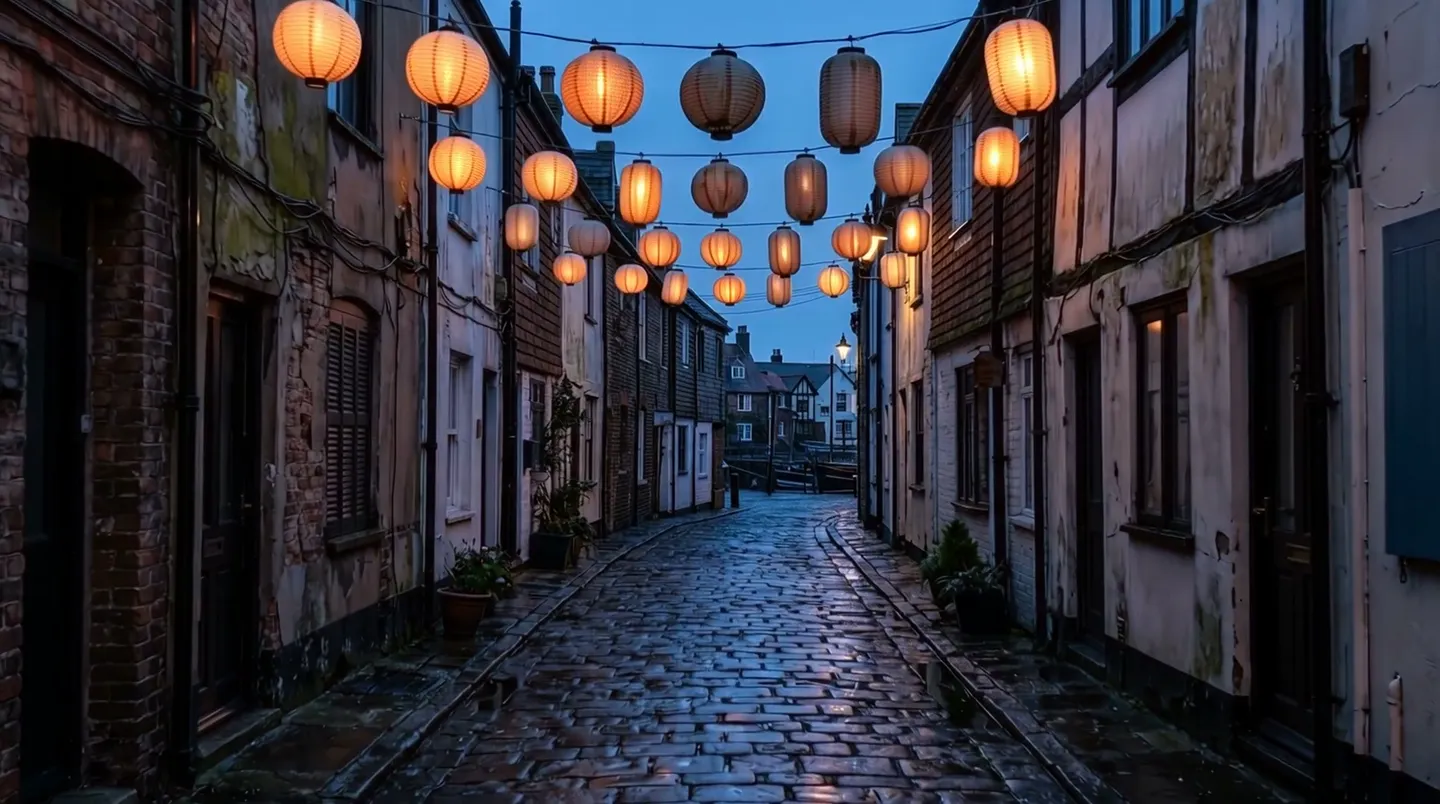
Generate single shot. [What changes, in order]. [Camera move that links the frames]. [What we hear].Generate single shot. The lanterns along the alley light one by one, from the nearest to the farthest, and a warm glow spreads across the wet cobblestones. The camera glides slowly down the alley. A soft whoomp as each lantern catches, distant rain on the rooftops. No dialogue.[What changes, in order]The transformation as a chain of verbs: the lanterns light one by one, and the glow spreads across the wet cobblestones.[Camera move that links the frames]One simple move, or none: the camera glides slowly down the alley. Write "Fixed camera." when the frames share a framing.[What we hear]The sounds of the change: a soft whoomp as each lantern catches, distant rain, no dialogue.
Prompts to start from
A reveal between two frames
Generate single shot. At sunrise a small dew-covered pumpkin sits in a pumpkin patch. Suddenly it cracks open with a loud crack; a warm light pours from the split as it falls apart, releasing a puff of white mist, and a small rabbit blinks in the center. Fixed camera. A dull crack, a soft hiss of mist, birdsong.Why it works: The first frame is the whole pumpkin and the last is the rabbit; the prompt is the event between them, with a fixed camera so the two frames line up.
A camera move as the bridge
Generate single shot. The small black cat looks up at the sky with curiosity. The camera rises steadily from eye level and ends looking straight down on the cat's upturned face. Quiet garden ambience.Why it works: The first frame is at eye level and the last looks straight down, so the camera move is what joins them.
Before and after
Generate single shot. The snow on the park bench melts away, the grass beneath turns green, and the bare tree above it bursts into pink blossom, petals drifting onto the seat. Slow push in. Dripping water, then birdsong and a light breeze.Why it works: Make a winter frame and a spring frame from the same angle; the prompt orders the change so it reads as one smooth season shift.
A seamless loop
Generate single shot. The koi circle slowly through the pond, drifting out of the frame on the left and back in on the right, ripples spreading and settling. Fixed camera, top-down. Trickling water, a faint wind chime.Why it works: Use the same picture as First Frame and Last Frame, and write motion that returns to where it began, so the clip loops cleanly.
Advanced
Advanced Blueberry prompting
Techniques for more control once the basics work.
Blueberry 2 or the original Blueberry
Blueberry 2 takes a First Frame, or a First and a Last Frame, reads single or multiple shots from your words, and takes long, detailed prompts. Use it unless you are matching work made on the original.
The original Blueberry takes a First Frame only, and keeps prompts shorter. It cuts between shots only when you set Shot Type to Multi Shot, add a First Frame, and turn on Prompt Extend.
- A Last Frame sent without a First Frame is dropped, and the clip is made from the text alone.
- Leave Prompt Extend off when you wrote the shot: it has Blueberry rewrite your prompt.
Frames and transitions
The clip takes the First Frame's shape, so make the Last Frame the same shape and size, with the same subject and setting, unless the move between them is what changes them.
Describe the path from the first state to the last: what moves first, what follows, and where everything ends. A big difference between the frames needs a named bridge; a small one needs only the change and a still or gentle camera.
- Keep the camera simple between two frames: a glide, a push in, a slow pan, or a rise. Busy moves fight the frames.
- A loop: the same picture as First and Last Frame, with motion that comes back to where it started.
- A longer sequence: the last frame of one clip becomes the First Frame of the next.
- Blueberry takes no Characters or References. For a recurring person, make both frames with your saved Character on an image model such as Mango, then animate between them.
Clips from text alone
Without frames, Blueberry needs everything a picture would have given it. Write the subject and the scene as they look, the motion with how big and how fast it is, the light source and its quality, the shot size, angle, lens and camera move, the style, and the sound.
A clip in four timed shots
A calm vision of a future city and its gardens. Shot 1 [0-2s]: Wide shot of a rooftop garden, floating plants swaying in the breeze. Shot 2 [2-4s]: A robot gardener trims a hedge with precise, graceful movements. Shot 3 [4-7s]: Sunlight streams through a glass dome and lights the whole garden. Shot 4 [7-10s]: The camera pulls back to reveal the vast city, the garden one small part of it. Soft ambient synth music, birdsong.Why it works: One sentence sets the theme and mood, and numbered, timed shots tell Blueberry 2 where to cut. Set the length to 10 seconds.
Camera, light, and style
Each camera move says something: a push in builds tension, a pull back reveals, tracking travels with the subject, an orbit gives importance, and a fixed camera holds still while the subject moves. "A drone fly-through, then it rises fast and tilts up" gives scale.
Name the light by its source and its quality: daylight, firelight, overcast light, practical light, moonlight, fluorescent, or mixed; soft, hard, side, rim, back, or top light; high or low contrast.
- Styles that work: felt, 3D cartoon, pixel art, puppet animation, claymation, black-and-white animation, time-lapse.
- Shot sizes run close-up, medium close-up, medium, medium full, wide, establishing; angles eye level, over-the-shoulder, high, low, top-down, aerial; lenses telephoto, wide-angle, fisheye, tilt-shift.
| Write | What it does |
|---|---|
orbit | The camera circles the subject. Keep the arc under 45 degrees, or the space warps. |
fixed camera | The framing holds while the subject moves. |
tilt-shift | A lens that makes a real scene look like a miniature. |
establishing shot | A wide view that sets the place before the action. |
top-down | The camera looks straight down on the scene. |
Sound, dialogue, and an audio clip
Blueberry makes voices, effects, and music to fit the picture. Quote a line and describe how it sounds: The fox says in a smooth, cynical voice: "…", with the emotion, tone, speed, timbre, and accent. Without a quoted line, Blueberry may improvise speech.
You can also mention one saved audio clip by its @handle. Its sound becomes the soundtrack: speech in it is lip-synced and motion follows its rhythm. Say what it is and who performs it, and that nothing else is added: "The audio is entirely the rap from @verse, with no other dialogue or noise."
- Two speakers: a fixed label for each, never a pronoun; the speaker's action before the line; a voice description for each; and timing words between lines ("Immediately, the woman replies: …").
- Effects: the source, the material, and the action ("a dull crack as the pumpkin splits, a soft hiss of mist"). Music: its kind and its mood.
- Silence: "No dialogue." and "No background music."
- An audio clip longer than the video is cut, and a shorter one leaves silence at the end, so match its length to the clip.
A first frame driven by a saved audio clip
A graffiti boy made of spray paint peels himself off a concrete wall under a railway bridge at night and raps fast to @verse, hitting a classic, high-energy rapper pose on every beat. A single street lamp lights him. The audio is entirely the rap, with no other dialogue or noise.Why it works: The saved clip drives the soundtrack, the lip sync, and the rhythm of the poses, and the last sentence keeps anything else out. Replace @verse with your own audio clip.
Text, negative prompt, and other settings
Exact text renders only roughly. Keep it to one short quoted word on a sign, and add anything that must be readable in an editor afterwards.
Blueberry has a Negative Prompt setting: put what keeps appearing there, such as text, extra people, or a cut, and keep the prompt for what you want.
Common mistakes
Avoid this, do this instead
Avoid: A cut in a clip between two frames.
Instead: "Generate single shot." as the first line.
Avoid: Describing the frames again.
A cozy living room with a grey sofa, a wooden table and a big window, first with the lamp off and then with the lamp on.Instead: The action between them.
Generate single shot. A hand reaches into the frame and switches on the lamp; warm light blooms across the sofa and the table, and the window darkens by contrast. Fixed camera. A soft click, a faint hum.Avoid: A jump instead of a transition.
Instead: The camera or subject move that links the two frames.
Avoid: A Last Frame without a First Frame.
Instead: Both frames, or neither.
Avoid: A long chain of actions in a short clip.
Instead: One main action and one reaction, or a longer clip.
Avoid: Frames of different shapes or angles.
Instead: Two frames of the same shape, made from the same angle.
FAQ
Blueberry prompting questions
How long should a Blueberry prompt be?
How do I keep a character consistent in Blueberry?
Can Blueberry do text?
Why did my Blueberry clip cut in the middle?
How do I make a loop with Blueberry?
Can Blueberry lip-sync to my own audio?
Does Blueberry support negative prompts?
Prompting guide
More prompting guides
How to prompt Berry
How to prompt Berry, Mage's reference-faithful video model: a one-minute quick start, a template, and expert tips for references, timing, dialogue, and edits.
How to prompt Cherry
How to prompt Cherry, Mage's video model: a one-minute quick start, a fill-in template, and expert tips for shots, camera, characters, sound, and edits.
How to prompt Grok Video
How to prompt Grok Video, xAI's Grok Imagine, on Mage: a quick start, a fill-in template, and expert tips for camera, references, edits, and sound.
How to prompt Kiwi
How to prompt Kiwi, Mage's everyday video model: a one-minute quick start, a fill-in template, and tips for light, camera moves, start images, and sound.
How to prompt Lemon
How to prompt Lemon, Mage's all-round video model: a one-minute quick start, a template, and expert tips for frames, references, voices, shots, and edits.
How to prompt LTX Video
How to prompt LTX Video on Mage: a quick start, a fill-in template, and expert tips for the 120-word rule, start frames, camera moves, and fast drafts.

Make your first video with Blueberry 2
New accounts get 300 free Gems, enough to try Blueberry 2. No install, no credit card.
Try Blueberry 2