
Prompting guide
How to prompt Berry
How to prompt Berry, Mage's reference-faithful video model: a one-minute quick start, a template, and expert tips for references, timing, dialogue, and edits.
Quick start
Your first great Berry prompt
Everything a beginner needs in one minute: what to know first, the rules that matter most, a template to fill in, and prompts to copy.
What to know first
Berry stays faithful to the pictures you give it. Add reference pictures (your uploads, saved Characters, saved References) and it casts the clip from them; add a First Frame instead and the clip starts on it; or write text alone. Berry 2, the current model, takes the prompt literally: it follows times, counts, and positions exactly and speaks scripted lines reliably. Every clip has sound, so say what we hear. Length, resolution, and aspect ratio are settings.
The rules that matter most
Say what every picture is, first
Open with one line that gives each picture its job: "[Image 1] is the scene: a candle-lit study at night. [Image 2] is the scholar." Then name what you take from each.
Scene, subject, motion, then sound
Keep that order, and end with a short line on what must stay the same and what never appears: the faces and costumes, no subtitles.
Give the camera its own sentence
Write the camera apart from the acting, and say what it must not do: "Camera: fixed, no shake, no zoom, no cut."
Script the lines and the silences
Put each line after its speaker, at most two lines per beat. A silent placeholder such as [Jun / silent / tense / no line] stops Berry from inventing filler.
Plan two or three takes
Berry varies from run to run. Draft at the lowest resolution on Berry 2, run the shot that matters a few times, and keep the best.
Fill in this template
Replace each part in square brackets with your own idea, and leave out a part you do not need.
[Who] [does what, in order] in [where].
[Look and light].
Camera: [shot size and one move], no shake, no cut.
Sound: [line, effects, ambience].
Keep every face and costume identical; no subtitles or watermarks.Mara (@mara) walks to the desk, picks up the unfinished letter, and reads it, her shoulders sinking, in a candle-lit study at night.
Realistic period drama, warm candlelight from the right, low-saturation grade, fine film grain.
Camera: medium shot pushing in slowly, no shake, no cut.
Sound: she says quietly: "You wrote all night." Candle crackle, wind against the shutters.
Keep every face and costume identical; no subtitles or watermarks.[Who]The person, by name and @handle or by look: Mara (@mara), or a woman in a red raincoat.[does what, in order]Two or three concrete actions: walks to the desk, picks up the letter, reads it.[where]The place and the time: a candle-lit study at night.[Look and light]One style sentence: the style, the direction of the light, the color grade, the texture.[shot size and one move]How it is filmed: a medium shot pushing in slowly.[line, effects, ambience]A quoted line after its speaker, then the sounds. Write "No dialogue" for a wordless clip.
Prompts to start from
Two people, three beats
[Image 1] is the scene: a candle-lit study at night. [Image 2] is the scholar. [Image 3] is his wife.
Realistic period drama, warm candlelight from the right, low-saturation grade, fine film grain, real skin texture.
[Image 2] the scholar: dark round-collared robe, hair tied up, tired and restrained.
[Image 3] his wife: pale embroidered jacket, simple bun, calm, holding back her feelings.
[00:00-00:04] Medium shot. She walks to the desk, her eyes falling on the unfinished letter. [The wife / quiet / "You wrote all night."]
[00:04-00:07] Close shot. He stops his brush mid-stroke and looks up. [The scholar / tired / "It had to be finished."]
[00:07-00:10] Two-shot. They hold each other's gaze; the candle flame wavers. [Both / silent / no line]
Camera: fixed, no shake, no zoom, no cut.
Lips sync naturally and every line is spoken in full. Keep the faces and costumes of [Image 2] and [Image 3] identical. No subtitles, printed text, logos or watermarks.
Why it works: Upload the study first and the two people after it. Each picture has its job, each person a short card, each beat at most one line, and the last line locks the faces. Set the length to 10 seconds.
From a first frame
She slowly turns her head toward the window as a breeze lifts strands of her hair, then smiles. Fixed camera, medium close-up. Sound: cicadas outside, a soft breeze.Why it works: The frame already shows her and the room, so the prompt is two or three actions, one camera instruction, and the sound, and nothing about how she looks.
Your saved Characters meet
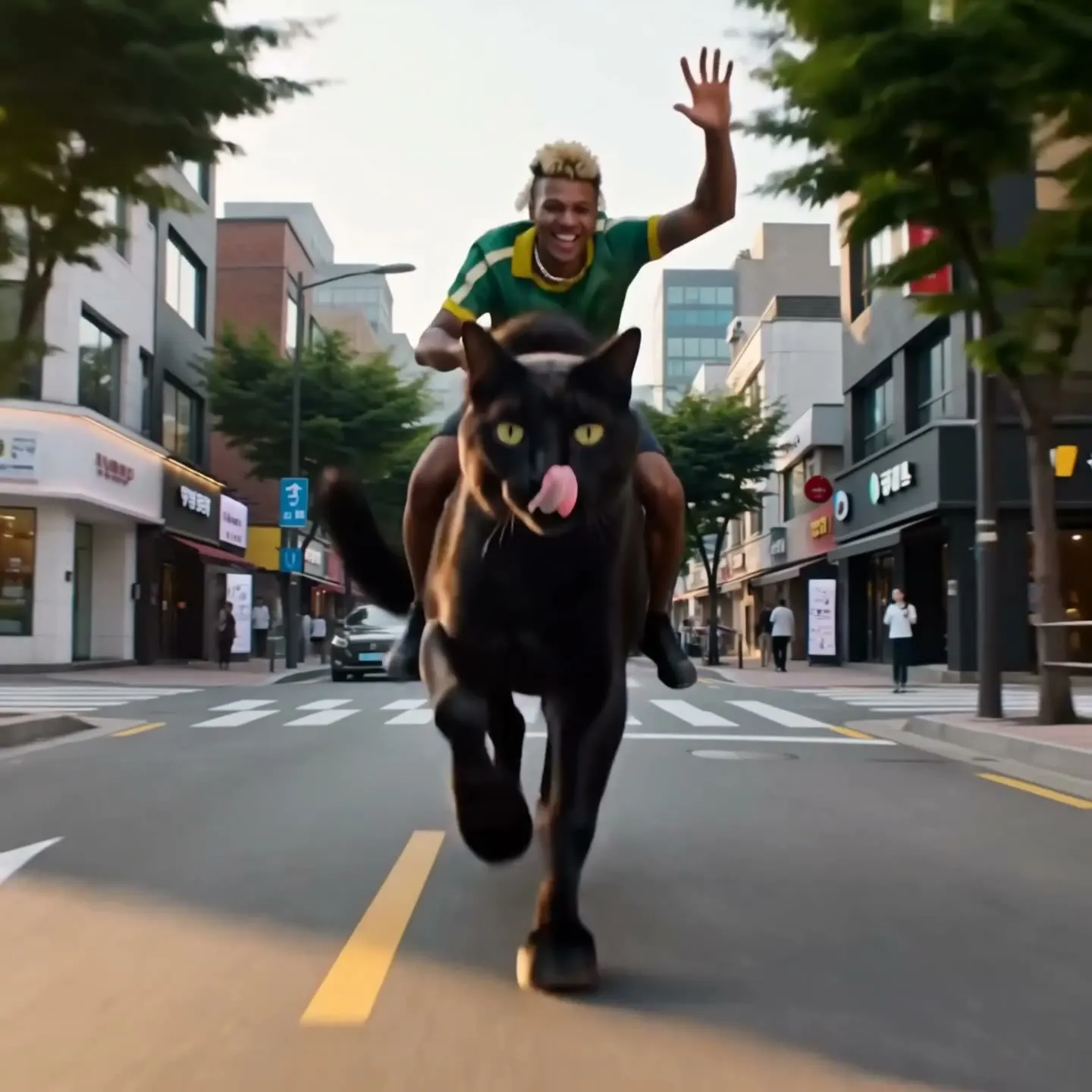
Davi (@davi) rides a horse-sized black cat (@shadow) down a sunny city street like a cowboy, one hand on the reins, the cat's tail swishing. Low tracking shot alongside them. Sound: heavy paws on asphalt, car horns, a twangy western guitar. Keep both designs identical to their references; no subtitles or watermarks.Why it works: Each Character is mentioned once by @handle, the action stays simple, and Berry spends its effort on keeping both true to their pictures. Use your own handles.
Restrained emotion, written loosely
[Image 1] is the woman. Realistic drama, one continuous shot with no cuts. Soft warm light from the upper right, shallow depth of field. Keep her face, hair and dress identical to [Image 1].
She begins calm, eyes lowered, then presses her lips together and her brows draw in slightly. She speaks very softly, each word catching in her throat: "I was wrong about you." Her eyes fill; one small tear runs down her left cheek and she holds back from crying aloud. She does not look up, shake her head or turn away.
Camera: starts at a chest-up shot and pushes in very slowly and evenly to her face, about 1.3x; no shake, no zoom, no cut.
No subtitles or on-screen text.
Why it works: No timecodes, so Berry 2 does not play the moment stiffly; the emotion is spelled out as small visible changes, and the last sentence of the acting lists what she must not do.
Advanced
Advanced Berry prompting
Techniques for more control once the basics work.
Berry 2 or the original Berry
Berry 2 is literal. It executes times, counts, and positions exactly, copies reference pictures closely, and delivers scripted lines reliably: the one for consistent characters and props, sequences of several shots, and scenes full of dialogue.
The original Berry is freer. Its acting is more natural and improvised, it treats times as loose hints, it reads English prompts best, and it is the Berry that edits a video you upload. For one character's restrained, emotional acting, use it, or write loosely on Berry 2 with no times at all.
- Draft at the lowest resolution on Berry 2, then rerun the keeper higher.
- Results differ noticeably from run to run: for a shot that matters, plan two or three takes and pick one.
Structure: declare, style, cast, act, lock
With reference pictures, write five parts in order. A first line that declares every picture's job. One style sentence: visual style, direction of the light, color grade, texture. One short card per character: silhouette, costume, emotional state. The body: timed beats or loose narration, with the lines. A closing line on what stays identical and what never appears.
With text only, open with the look (style, grade, the character of the lens), add a Characters: line and a Location: line, then the timed beats, and close with a line on physics and consistency.
- For a scene with people, make [Image 1] the location, then one picture per character.
- Give a product its own picture, so Berry places it as a hero object instead of putting it on someone.
- Name what you take from a picture: "the woman in a red qipao from [Image 1]", "the fan from [Image 2]".
- Be specific: "the camera slowly pushes from full body to a chest close-up" rather than "the camera moves"; "her hair streams to the right in the wind" rather than "moving".
An action scene from text
High-octane motorcycle chase across a collapsing suspension bridge at sunset. Photorealistic, teal-and-orange grade, anamorphic lens flares, heavy smoke. Widescreen.
Characters: The Rider, an athletic man in his 30s in a black leather jacket, no helmet, on a matte-black sport bike. Location: a suspension bridge over a bay, abandoned cars across the lanes.
[00:00-00:04] Low tracking shot. The Rider weaves between abandoned cars at full speed as steel cables snap overhead. Screaming engine, metallic shrieks.
[00:04-00:08] Front crash-zoom. The roadway ahead cracks and tilts upward; he accelerates up the rising slab like a ramp. Groaning metal, engine at redline.
[00:08-00:12] Slow-motion side wide shot. The bike sails over the gap against the burning sky, then lands hard on the far side, suspension compressing, sparks flying. Music drops out, then a percussive score slams back in on landing.
Realistic vehicle physics. Stable rider and motorcycle design throughout, no morphing, no deformation. No text, no watermarks, no subtitles on screen.
Why it works: The look, the cast, and the place come first, then three timed beats with a camera and the sound of each, and a closing line that keeps the bike from morphing. Set the length to 12 seconds and a 16:9 aspect ratio.
Times or loose narration
Berry 2 plays timed beats such as [00:00-00:04] exactly as written. Use them for positions, props, several shots, the rhythm of a brand film, and dialogue scenes, with at most two lines per beat.
Drop the times for one character's subtle emotion, long pauses, a monologue, or a dense stream of continuous action. Write the moments in their natural order, without times and without "pause two seconds"; Berry 2 then acts more freely.
- Cover the whole clip with beats. Left with empty seconds, Berry adds drama or filler lines of its own.
- When Berry over-acts, list what is off limits: "no loud crying, no exaggerated sobbing, no head shaking".
Camera and motion
Give the camera its own paragraph, never mixed into the acting, and say what it must not do: "no shake, no zoom, no cut". Measure a push in: "pushes in slowly and evenly from a chest-up shot to a face close-up, about 1.3x".
A fixed camera must stay fixed in every sentence. If any line of the prompt implies a push in, Berry follows it.
| Write | What it does |
|---|---|
low tracking shot | The camera travels close to the ground beside the action. |
front crash-zoom | A sudden, hard zoom toward the subject from the front. |
slow-motion side wide shot | A wide profile view of the action, slowed down. |
hard cut to rear tracking | Cuts to a camera following from behind. |
aerial chase angle | A high camera flying after the action. |
binocular POV with a circular vignette | A point of view through binoculars. |
single continuous shot, no cuts, no camera movement | One locked-off take from start to end. |
Style and look
Stack the look in one sentence: "teal-and-orange blockbuster grade, IMAX-scale spectacle, anamorphic lens flares, practical destruction realism", or "photorealistic luxury fashion-ad cinematography, warm low sun, shallow depth of field, elegant motion blur, 24fps film look".
Guard a style so it holds through the clip: "ink-wash animation style maintained throughout, no color shift"; "NOT illustration, NOT anime"; "original design, not resembling existing characters".
References and Characters
Berry reads pictures by number, in square brackets with a space: [Image 1], [Image 2]. Written [Image1], without the space, the reference breaks. Your uploads come first, in the order you added them, then the Characters and References you mention, in the order you first mention them.
Mage sends a mention such as @mara as "character from image 2", so write the handle once beside its number and use the name after that: "[Image 2] is Mara (@mara)." Each character picture should show that one person only, and the closing line locks them: "Keep [Image 2]'s face, hair and costume identical in every shot."
- Berry does not use saved voices. Describe a voice in the line itself: [Mara / low, restrained / "You wrote all night."]
- Storyboards: upload the grid as [Image 1], write "Follow panel order 1 to 9, left to right, top to bottom", and describe cells by number ("Cell 4 (middle left): …"). Berry splits the time between the cells.
- Berry 2 copies text from its references, a storyboard's captions and cell numbers included. Remove the text from reference pictures before you upload them, and ban it in the closing line.
- A story across several clips: keep the same first line, style sentence, character cards, and closing line in every clip and change only the body. Open each body with "Continuing from the previous clip:" and the positions, hands, light, and props.
- For tighter joins between clips, add a frame from the middle and the last frame of the previous clip as extra references.
Sound and dialogue
Berry makes sound with every clip: dialogue, effects, ambience, and music. Write lines in one of three forms: [Mara / low, restrained / "You wrote all night."] inside timed beats; a line folded into the narration for loose acting (she says, barely audible: "I was wrong about you."); or plainly, Jun says quietly: "Let's go."
Put effects and music at the end of each beat or of the prompt: "Screaming engine, rotor thunder closing in", "Music drops to silence, only wind", "Driving percussive score slams back in on landing".
- In English, keep each line to one short sentence. At most two lines per timed beat gives the best lip sync.
- In Chinese, budget about 4 characters per second, times 1.2 for an emotional delivery, plus half a second to a second of slack: a 5-second beat fits about 17 characters.
- A silent placeholder, [Jun / silent / tense / no line], keeps a character quiet. Write "No dialogue" for a wordless clip.
- When lip sync misses: fewer lines, a longer beat, no entrance action for someone already on screen, and a speaking verb right before the line ("she opens her mouth and says: …"). A narrator's line (Narrator: "…") clashes less with lip sync than speech on screen.
- Write each line in the language the character speaks: Japanese for a Japanese school scene, Korean for a Korean drama.
Text on screen
Ban text in the closing line: "No subtitles, captions, printed text, logos or watermarks on screen."
When text belongs in the scene, control it rather than ban it: let it be soft background texture ("old vertical brush calligraphy on the scrolls, soft-focus, unreadable") and rule out legible blocks of text.
- For a product's own logo: "Every cap and shoe shows the red star logo clearly; no text overlays, no extra graphics."
Editing a video you upload
Upload a source clip in the Video setting and Berry edits it. Edits run on the original Berry, and the result keeps the length of the part it edits, the opening of a long clip. Always pair what changes with what stays exactly as it is.
A reference picture plus words beats either alone for a new material or costume. Upload it and call it Image 1 in the prompt.
- Swapping an object: restate the motion the new one inherits (path, speed, direction, where it touches things) and that its light and shadows match the source.
- Changing the style: name every element to restyle (the mountains, the mist, the buildings) and keep "the camera path and scene layout unchanged".
- Several changes: one sentence per change, each with its own keep clause.
Swap a moving object
Replace the white cruise ship in the video with the spaceship from Image 1. The spaceship follows the ship's original path, speed and heading exactly, and its light, reflections and shadows match the source lighting. The water, the sky and the camera path stay 100% unchanged.Why it works: The new object takes over the old one's exact motion and light, and everything else is named as unchanged.
Common mistakes
Avoid this, do this instead
Avoid: Restating what a first frame already shows.
A young woman with long black hair in a white linen dress sits in a sunlit room with green curtains. She turns her head toward the window and smiles.Instead: The action, the camera, and the sound only.
She slowly turns her head toward the window as a breeze lifts strands of her hair, then smiles. Fixed camera, medium close-up. Sound: cicadas outside, a soft breeze.Avoid: Camera directions mixed into the acting.
She walks to the desk as the camera pushes in and she picks up the letter while the camera tilts down.Instead: A separate camera paragraph that also says what not to do.
She walks to the desk and picks up the letter. Camera: pushes in slowly from a medium shot to a close-up; no shake, no cut.Avoid: [Image1] without a space.
Instead: [Image 1], with the space.
Avoid: Over-acting and wailing.
Instead: A list of what is off limits: "no loud crying, no exaggerated sobbing, no head shaking".
Avoid: Berry adding drama or filler lines.
Instead: A shorter clip, silent placeholders, and beats that cover the whole length.
Avoid: Captions copied from a storyboard.
Instead: Reference pictures with no text, and a ban in the closing line.
Avoid: Faces, vehicles, or props that morph.
Instead: "Stable character and vehicle design throughout, no morphing, no deformation."
Avoid: Timed beats for a quiet, emotional scene on Berry 2.
Instead: Loose narration in natural order, or the original Berry.
FAQ
Berry prompting questions
How long should a Berry prompt be?
How do I keep a character consistent in Berry?
Can Berry do text?
Does Berry support negative prompts?
Can Berry use my Characters' saved voices?
Can I use a first frame and reference pictures together?
Why does Berry give a different result each time?
Prompting guide
More prompting guides
How to prompt Blueberry
How to prompt Blueberry, Mage's first-and-last-frame video model: a quick start, a template, and expert tips for transitions, loops, camera moves, and sound.
How to prompt Cherry
How to prompt Cherry, Mage's video model: a one-minute quick start, a fill-in template, and expert tips for shots, camera, characters, sound, and edits.
How to prompt Grok Video
How to prompt Grok Video, xAI's Grok Imagine, on Mage: a quick start, a fill-in template, and expert tips for camera, references, edits, and sound.
How to prompt Kiwi
How to prompt Kiwi, Mage's everyday video model: a one-minute quick start, a fill-in template, and tips for light, camera moves, start images, and sound.
How to prompt Lemon
How to prompt Lemon, Mage's all-round video model: a one-minute quick start, a template, and expert tips for frames, references, voices, shots, and edits.
How to prompt LTX Video
How to prompt LTX Video on Mage: a quick start, a fill-in template, and expert tips for the 120-word rule, start frames, camera moves, and fast drafts.

Make your first video with Berry 2
New accounts get 300 free Gems, enough to try Berry 2. No install, no credit card.
Try Berry 2