
Prompting guide
How to prompt Raspberry
How to prompt Raspberry, Mage's character video model: a one-minute quick start, a template, and expert tips for casting Characters, voices, and dialogue.
Quick start
Your first great Raspberry prompt
Everything a beginner needs in one minute: what to know first, the rules that matter most, a template to fill in, and prompts to copy.
What to know first
Raspberry casts a scene from your pictures and has the cast act and speak. Mention saved Characters by @handle and they bring their saved voices; upload pictures of other people, props, and places; add a First Frame to fix the opening shot. Then the prompt is simple: who does what, where, and what they say. Quoted lines come out in the speaker's voice, and every clip has sound.
The rules that matter most
Say who is who, by picture
Name each person, prop, and place by its @handle or its picture number, and say where they meet: "@ines sits in the café from Image 2, holding the guitar from Image 1."
One person per character picture
A picture used for a person should show only that person. Crop group photos, or two people blend into one.
Give places and props their own picture
Don't ask a portrait to supply the background. Upload the location as its own picture and cite it.
Quote the lines, in the voice's language
@noor says: "I'm not leaving tonight." A saved voice speaks its Character's lines on its own; write them in the language of the voice sample.
Say what the music is, or that there is none
Name the music's kind and mood ("a soothing country folk song"), or write "No background music." Without a line of dialogue, Raspberry may improvise one: write "No dialogue." for a silent clip.
Fill in this template
Replace each part in square brackets with your own idea, and leave out a part you do not need.
[Who] [does what, in order] in [where]. [Who speaks] says: "[line]" [Light, shot size, and camera move]. [Music or sound].@ines sits on a stool, tunes the guitar from Image 1, and starts to play in the café from Image 2. She says: "The sunshine is so nice today." Warm afternoon light through the front window, medium shot, slow push in. A soothing country folk song on the guitar.[Who]The Character by @handle, or a person from an upload: @ines, or the woman from Image 1.[does what, in order]The action as a chain: sits on a stool, tunes the guitar, starts to play.[where]The place, ideally from its own picture: the café from Image 2.[Who speaks]The speaker, the same label every time: She, or @tomas.[line]The exact words, in the language of the voice: The sunshine is so nice today.[Light, shot size, and camera move]How it looks and is filmed: warm afternoon light, medium shot, slow push in.[Music or sound]What else we hear: a soothing country folk song, or "No background music."
Prompts to start from
Two Characters, a prop, and a place
@ines sits on a stool in the café from Image 2, holding the guitar from Image 1, and plays a soothing country folk song. She says: "The sunshine is so nice today." @tomas walks past carrying two coffees, sets one on the table beside her, smiles and says: "That sounds lovely. Can you play it again?" Warm afternoon light through the front window, medium shot, slow push in.Why it works: Upload the guitar and then the café, and mention both Characters: each line comes out in its speaker's saved voice. Mage numbers this as guitar 1, café 2, Ines 3, Tomás 4. Set the length to 10 seconds.
One Character, one line, no music
Generate single shot. @noor leans on a rain-streaked window in a dim apartment, turns to the camera and says quietly: "I'm not leaving tonight." Cool blue light from the street, a warm lamp behind her, medium close-up, fixed camera. Rain on the glass. No background music.Why it works: The first line keeps it one continuous take, the saved voice speaks the line, and "No background music." leaves only the rain.
A reaction shot
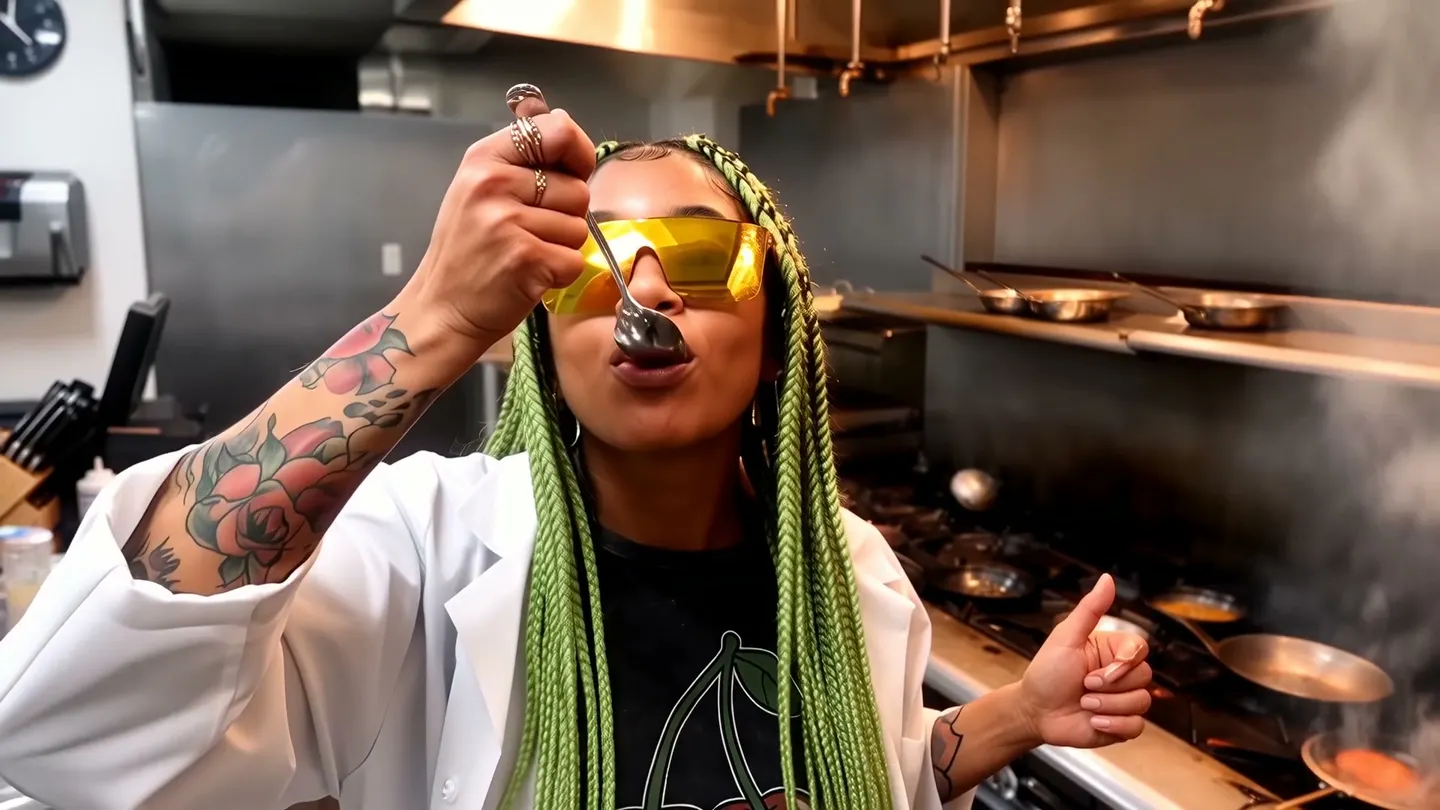
Generate single shot. @marco tastes a sauce from a wooden spoon in a busy restaurant kitchen, pauses, then grins and gives the camera a thumbs up. Flames and steam rise behind him. Handheld camera, medium shot, warm tungsten light. Sizzling pans, a clatter of plates, kitchen chatter. No dialogue.Why it works: One performer, one action, one camera: the short scene Raspberry does best. Replace @marco with your own Character.
From a first frame
She sets the teacup down, glances toward the door as it creaks open, and breaks into a smile. The camera pushes in slowly to a close-up. The door's creak, a soft clink of porcelain.Why it works: The First Frame holds her look and the room, so the prompt is only the motion, the camera, and the sound.
Advanced
Advanced Raspberry prompting
Techniques for more control once the basics work.
What you add decides the mode
With reference pictures (uploads, Characters, References), Raspberry casts the clip from them. Add a First Frame as well and the clip opens on that frame while the references keep the people and props on model through the motion. With a First Frame alone, the clip starts on the picture and the prompt only has to move it. With text alone, describe everything.
For text alone, write the subject, the scene, the motion, the light, the shot size, angle, lens and camera move, the style, and the sound. Raspberry has no last frame.
Citing your pictures
Raspberry reads pictures as Image 1, Image 2, in the order they arrive. Your uploads come first, in the order you added them, then the Characters you mention, then the References, each in the order you first mention them. Mage turns @mara into "character from image 3" and a saved outfit into "outfit from image 4", so a mention already carries its number. The First Frame is not numbered.
Two ways to place people: "Image 1 in Image 2" puts the person from one picture into the place from another, or write it out: "the cat from Image 1 plays in the living room from Image 2".
- Props get their own picture too, cited where they are used: "holds the guitar from Image 3".
- When the wrong person or prop appears, recount: uploads first, then Characters, then References.
- A storyboard sheet: upload one multi-panel board as a reference and write the clip as shots. Give the key shots and Raspberry fills in the rest. One board per clip.
One take or several shots
Raspberry reads shots from your words and decides on its own when you do not say. For several shots, write one overall sentence, then Shot 1 [0-3s]: …, Shot 2 [3-6s]: …, covering the whole clip. For one continuous take, start with "Generate single shot."
A short scene in three shots
A quiet morning at a flower stall turns into a small surprise. Shot 1 [0-3s]: Wide shot, eye level, soft morning daylight. @lena arranges sunflowers in buckets at her stall in the market from Image 1. Shot 2 [3-6s]: Medium shot, slow push in. @sam steps up holding a single paper-wrapped tulip and says: "I think this one's yours." Shot 3 [6-9s]: Close-up on @lena. She laughs and takes it. Market chatter, a bicycle bell. No background music.Why it works: One sentence sets the scene, each shot has its own framing, the same labels are used throughout, and each Character speaks in their saved voice. Set the length to 9 seconds.
Voices and dialogue
A mentioned Character's saved voice comes along on its own, and nothing about it goes in the prompt: write that Character's lines and they come out in that voice. Write them in the same language as the voice sample. Turn off Use Character Voices to leave the saved voices out.
For several speakers, give each a fixed label (the same handle or name every time, never "he" or "she" between lines), show the speaker's action before the line, and link lines with timing words ("Then", "Immediately") so they do not overlap.
- For a person with no saved voice, describe one: "in a raspy, deep voice".
- Name the sounds of the actions: "the guitar's strum, chair legs scraping".
- Write "No dialogue." and "No background music." when you want them gone.
Camera, light, and style
Name the light (daylight, firelight, overcast, practical light, moonlight, mixed; soft, hard, side, rim, back) and the time (dawn, sunset, night). Give the shot a size (close-up, medium close-up, medium, wide, establishing), an angle (eye level, over-the-shoulder, low, high, aerial), and one move: push in, pull back, tracking, orbit, or a fixed camera.
Keep an orbit under 45 degrees. Styles that work: realistic, 3D cartoon, claymation, puppet animation, pixel art.
Prompt Extend, negative prompt, and text
Leave Prompt Extend off when you wrote the scene and its lines exactly: it has Raspberry rewrite your prompt. Use the Negative Prompt setting for what keeps appearing, such as extra people or subtitles.
Text renders only roughly. Keep it to a short quoted word on a sign, add anything that must be readable in an editor, and otherwise write "No subtitles or on-screen text."
Common mistakes
Avoid this, do this instead
Avoid: A group photo as a character picture.
Instead: One person per picture, each cited separately.
Avoid: A background pulled from a portrait.
Instead: A separate picture of the location, cited by number.
Avoid: Lines in a language the voice sample is not in.
Instead: Lines in the voice's own language.
Avoid: Pronouns between speakers' lines.
@ines plays the guitar. He walks in and says: "Again?" She says: "Sure." He sits down.Instead: The same label for a speaker every time.
@ines plays the guitar. @tomas walks in and says: "Again?" Then @ines smiles and says: "Sure." @tomas sits down beside her.Avoid: A wrong picture number.
Instead: A recount: uploads first, then Characters, then References.
Avoid: Several performers, actions, and camera moves in one short clip.
Instead: One performer, one action, one camera move.
FAQ
Raspberry prompting questions
How long should a Raspberry prompt be?
How do I keep a character consistent in Raspberry?
Can Raspberry do text?
How do I make my Character speak in their own voice?
Can I use a first frame and references together?
Why do two of my characters look like one person?
Does Raspberry support negative prompts?
Prompting guide
More prompting guides
How to prompt Berry
How to prompt Berry, Mage's reference-faithful video model: a one-minute quick start, a template, and expert tips for references, timing, dialogue, and edits.
How to prompt Blueberry
How to prompt Blueberry, Mage's first-and-last-frame video model: a quick start, a template, and expert tips for transitions, loops, camera moves, and sound.
How to prompt Cherry
How to prompt Cherry, Mage's video model: a one-minute quick start, a fill-in template, and expert tips for shots, camera, characters, sound, and edits.
How to prompt Grok Video
How to prompt Grok Video, xAI's Grok Imagine, on Mage: a quick start, a fill-in template, and expert tips for camera, references, edits, and sound.
How to prompt Kiwi
How to prompt Kiwi, Mage's everyday video model: a one-minute quick start, a fill-in template, and tips for light, camera moves, start images, and sound.
How to prompt Lemon
How to prompt Lemon, Mage's all-round video model: a one-minute quick start, a template, and expert tips for frames, references, voices, shots, and edits.

Make your first video with Raspberry
New accounts get 300 free Gems, enough to try Raspberry. No install, no credit card.
Try Raspberry