
Prompting guide
How to prompt Melon
How to prompt Melon, Mage's anime video model: a one-minute quick start, a fill-in template, and expert tips for camera moves, characters, frames, and audio.
Quick start
Your first great Melon prompt
Everything a beginner needs in one minute: what to know first, the rules that matter most, a template to fill in, and prompts to copy.
What to know first
Melon makes anime and illustrated motion. A good Melon prompt has five parts, in order: the character and what defines them, one main action, the camera, the place and its light, and the style last. Always give a camera direction: leaving it out weakens the clip. Sound is off until you turn on Generate Audio. Length, resolution, and aspect ratio are settings.
The rules that matter most
One main action per clip
A girl runs to the railing and stops; a boy catches a paper airplane. Several big actions in one clip blur together.
Always direct the camera, with one move
One movement, on one axis, with a direction and a speed word: "the camera slowly pushes in", "the camera gently pans right". Never stack two moves.
Define the character by what we see
Hair, outfit, and colors: "a girl with short silver hair and a red scarf". State emotion plainly ("tears welling up, heartbroken"); an implied mood is easy to miss.
Put the style last
End with the look: "Anime style, flat cel-shaded colors, soft rim light."
Turn on Generate Audio for sound
Dialogue, voiceover, effects, and music all need it. Then say who or what makes each sound, and when.
Fill in this template
Replace each part in square brackets with your own idea, and leave out a part you do not need.
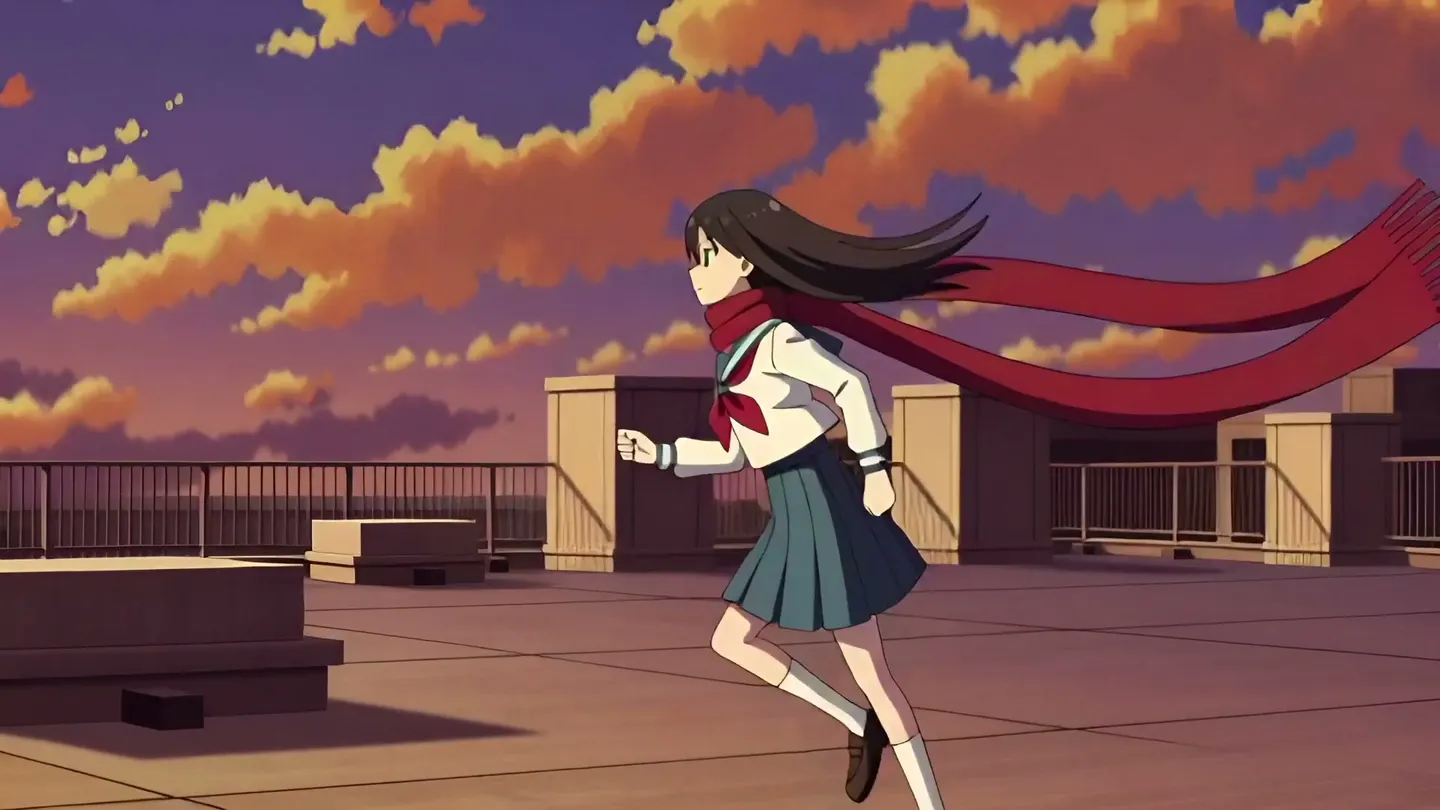
[Character, with hair, outfit, and colors] [one main action]. The camera [one slow move]. [Place, light, and moving details]. [Style].A girl with short silver hair and a red scarf runs along a school rooftop and stops at the railing, breathing hard, then looks out at the city. The camera slowly pushes in from a medium shot. Sunset sky in orange and violet, long shadows, wind tugging at her scarf. Anime style, flat cel-shaded colors, soft rim light.[Character, with hair, outfit, and colors]Who, by what defines them: a girl with short silver hair and a red scarf.[one main action]One action with a beginning and an end: runs along a school rooftop and stops at the railing, then looks out at the city.[one slow move]One move with a speed word: slowly pushes in from a medium shot.[Place, light, and moving details]Where, and what moves around them: sunset sky in orange and violet, wind tugging at her scarf.[Style]The look, last: anime style, flat cel-shaded colors, soft rim light.
Prompts to start from
Your Character in a scene
@mika, a boy with spiky black hair and a white school shirt, catches a paper airplane as it glides past the classroom window and smiles. The camera holds a steady medium close-up. Bright afternoon classroom, dust in the sunlight. Anime style, clean lineart, warm colors.Why it works: The handle is mentioned once, where he first appears, and then he is described by what we see. Replace @mika with your own Character.
Between a start and an end frame
The cat on the windowsill stretches, hops down to the floor and pads toward the sleeping girl, ending curled up beside her. The camera gently pans right. Quiet bedroom at night, blue moonlight. Anime style.Why it works: Add the two pictures as First Frame and Last Frame. The prompt is only the motion that carries one into the other, with one gentle move.
A rainy street at night
A boy in a dark hoodie with a clear umbrella walks slowly through a rainy shopping street at night, puddles reflecting the shop lights. The camera tracks steadily beside him. Neon signs blur in the rain, raindrops bounce off the umbrella. Anime style, flat cel shading, soft bloom.Why it works: One calm action, one tracking move, and the moving details (rain, reflections) that make anime motion feel alive.
Two shots with a line
A tall swordsman in a dark blue coat stands in a rainy alley and turns toward the camera. The camera slowly pushes in. He says in a low voice, "You shouldn't have followed me." Then the shot cuts to a close-up of a young woman under a paper umbrella, eyes wide, rain dripping from the umbrella's edge. Neon reflections on wet stone, steady rain. Anime style, flat cel shading.Why it works: The cut is written as a plain sentence, the line is quoted with its speaker and delivery, and Generate Audio is on. Set the length to 10 seconds.
Advanced
Advanced Melon prompting
Techniques for more control once the basics work.
Melon or Melon Pro
Melon is the cheaper of the two, for drafts and most clips; Melon Pro renders higher quality for finals. The same prompt works on both, so settle the action and camera on Melon, then render the keeper on Melon Pro.
Melon is tuned for anime and illustration. Photoreal subjects come out better on a live-action model such as Cherry or Plum.
Camera and motion
Give each clip one camera movement on one axis, with a direction: "the camera slowly pushes in", "the camera tilts up", "the camera pans left". Add a speed word (subtle, gentle, slow, steady). Stacked moves such as "slow dolly forward with slight pan left" and moves in opposite directions fight each other.
Keep the shot on faces and upper bodies. Complex full-body action at high intensity, precise hand work like grabbing or pointing, and cameras that orbit or chase a character are where anime motion breaks most often.
- Anime motion lives in the details: wind in hair, a scarf or a coat moving, rain, petals, dust in a light beam. Describe them.
- For a back view, add "back view, face hidden".
Cuts inside one clip
Melon can switch shots inside one clip, but it has no shot syntax. Write the shots as plain sentences in order: "Then the shot cuts to a close-up of …". Keep it to two or three shots, even in a long clip.
Start and end frames
A First Frame already shows the character, the place, and the style, so spend the prompt on the action and the camera. With a First and a Last Frame, describe the motion that carries the first picture into the last.
The two frames should be close in size and shape; the clip follows their aspect ratio. A Last Frame without a First Frame is dropped and the clip is made from text alone, so always pair them.
- Lock an art style by making the First Frame on an anime image model, then animating it on Melon.
- Frames and references are separate modes: one clip uses one or the other.
Characters and references
Mention saved Characters and References by @handle. Melon receives their pictures in order but without names, so a mention tells it little on its own: mention the handle once, where the character first appears, and then describe the character by visible traits.
Reference pictures hold best when they are clean: a front-facing character on a plain white or solid background, at the highest resolution you have, with flat colors. Gradients and busy backgrounds hold less well. Put the most important picture first, such as the main character's front view.
- For a series of clips, repeat the same character sentence (hair, eyes, outfit, colors) in every clip, and attach the same location each time.
- An @ followed by a word always reads as a mention, and one that matches nothing stops the generation. Never write an email address or a social handle in the prompt.
Sound and dialogue
Turn on Generate Audio for dialogue, voiceover, effects, and music. Spoken lines work in English, Japanese, and Chinese. Name the speaker and quote the exact line: The girl with silver hair says softly, "I waited for you." Keep lines short for the length of the clip.
Narration, effects, and music work the same way: say who or what makes the sound, and when. Melon takes no saved voices or audio clips.
Text on screen
Do not rely on Melon for on-screen text. Add titles and captions in an editor afterwards.
Common mistakes
Avoid this, do this instead
Avoid: Two camera moves at once.
The camera dollies forward with a slight pan left while circling around her.Instead: One move, on one axis, with a speed word.
The camera slowly pushes in.Avoid: A prompt with no camera direction.
Instead: One camera instruction in every prompt, even "the camera holds still".
Avoid: Several main actions in one clip.
Instead: One main action, with a beginning and an end.
Avoid: Intense full-body action, precise hand work, and orbiting or chasing cameras.
Instead: Faces and upper bodies, and a simple, steady camera.
Avoid: Busy, detailed reference pictures.
Instead: A front-facing character on a plain background, with flat colors.
Avoid: A Last Frame without a First Frame.
Instead: Both frames, close in size and shape.
Avoid: Repeating @handle through the prompt.
Instead: The handle once, then the character by visible traits.
FAQ
Melon prompting questions
How long should a Melon prompt be?
How do I keep a character consistent in Melon?
Can Melon do text?
Does Melon make sound?
Can Melon cut between shots?
Is Melon good for realistic video?
Prompting guide
More prompting guides
How to prompt Berry
How to prompt Berry, Mage's reference-faithful video model: a one-minute quick start, a template, and expert tips for references, timing, dialogue, and edits.
How to prompt Blueberry
How to prompt Blueberry, Mage's first-and-last-frame video model: a quick start, a template, and expert tips for transitions, loops, camera moves, and sound.
How to prompt Cherry
How to prompt Cherry, Mage's video model: a one-minute quick start, a fill-in template, and expert tips for shots, camera, characters, sound, and edits.
How to prompt Grok Video
How to prompt Grok Video, xAI's Grok Imagine, on Mage: a quick start, a fill-in template, and expert tips for camera, references, edits, and sound.
How to prompt Kiwi
How to prompt Kiwi, Mage's everyday video model: a one-minute quick start, a fill-in template, and tips for light, camera moves, start images, and sound.
How to prompt Lemon
How to prompt Lemon, Mage's all-round video model: a one-minute quick start, a template, and expert tips for frames, references, voices, shots, and edits.

Make your first video with Melon
New accounts get 300 free Gems, enough to try Melon. No install, no credit card.
Try Melon