
Prompting guide
How to prompt Seedream
How to prompt ByteDance's Seedream on Mage: a one-minute quick start, a fill-in template, and expert tips for detailed scenes, text, references, and edits.
Quick start
Your first great Seedream prompt
Everything a beginner needs in one minute: what to know first, the rules that matter most, a template to fill in, and prompts to copy.
What to know first
Seedream reads ordinary sentences, so describe the picture the way you would brief a photographer or an illustrator: what it is, what is in it and where, then the look and the light. Concrete facts do more than a pile of adjectives. To edit, upload the image and say what stays and what changes. The shape and size come from the settings, not from words in the prompt.
The rules that matter most
Describe, do not list
A sentence with a subject, an action, and a place ("an old fisherman mends a net on a pier at dawn") gives Seedream far more to work with than "fisherman, net, pier, dawn".
Name the kind of image first
When the picture has a job, lead with it: "A book cover for…", "A product shot of…", "A street sign that…". The layout follows from it.
Quote every word you want written
Text goes in double quotes, with where it sits and how it looks: a hand-painted sign reading "OPEN LATE" above the door, in white serif letters.
Edits start with what must not move
List what stays first, then the single change, then what it does to the scene: a new shadow, a reflection, how it blends with the light.
Leave size to the settings
Pick the aspect ratio and resolution in the settings. Writing "16:9" or "4K" into the prompt changes nothing.
Fill in this template
Replace each part in square brackets with your own idea, and leave out a part you do not need.
[Kind of image, if any] of [subject] [doing what] in [place]. [Other elements, each with its position]. [Medium or style]. [Light and where it comes from]. [Camera or framing].A documentary photograph of a florist in a canvas apron trimming the stems of a bunch of yellow tulips in a narrow flower shop with a checkered tiled floor. Buckets of red roses line the left wall, and a blue bicycle leans against the glass outside. Soft morning light comes through the front window from the right. 35mm lens at waist height.[Kind of image, if any]What the picture is for: a magazine cover, a menu, a packshot. Skip it for an everyday scene.[subject]The main person or thing, with two or three visible facts: a florist in a canvas apron.[doing what]The action or pose: trims the stems of a bunch of tulips.[place]Where it happens: a narrow flower shop with a tiled floor.[Other elements, each with its position]Everything else that must appear, and where: buckets of roses along the left wall, a bicycle outside the window.[Medium or style]A precise name: documentary photograph, gouache illustration, clay render, ukiyo-e print.[Light and where it comes from]One source and its direction: soft morning light through the front window, from the right.[Camera or framing]How it is shot: a 35mm lens at waist height, a top-down view, a tight close-up.
Prompts to start from
A crowded scene that stays in order
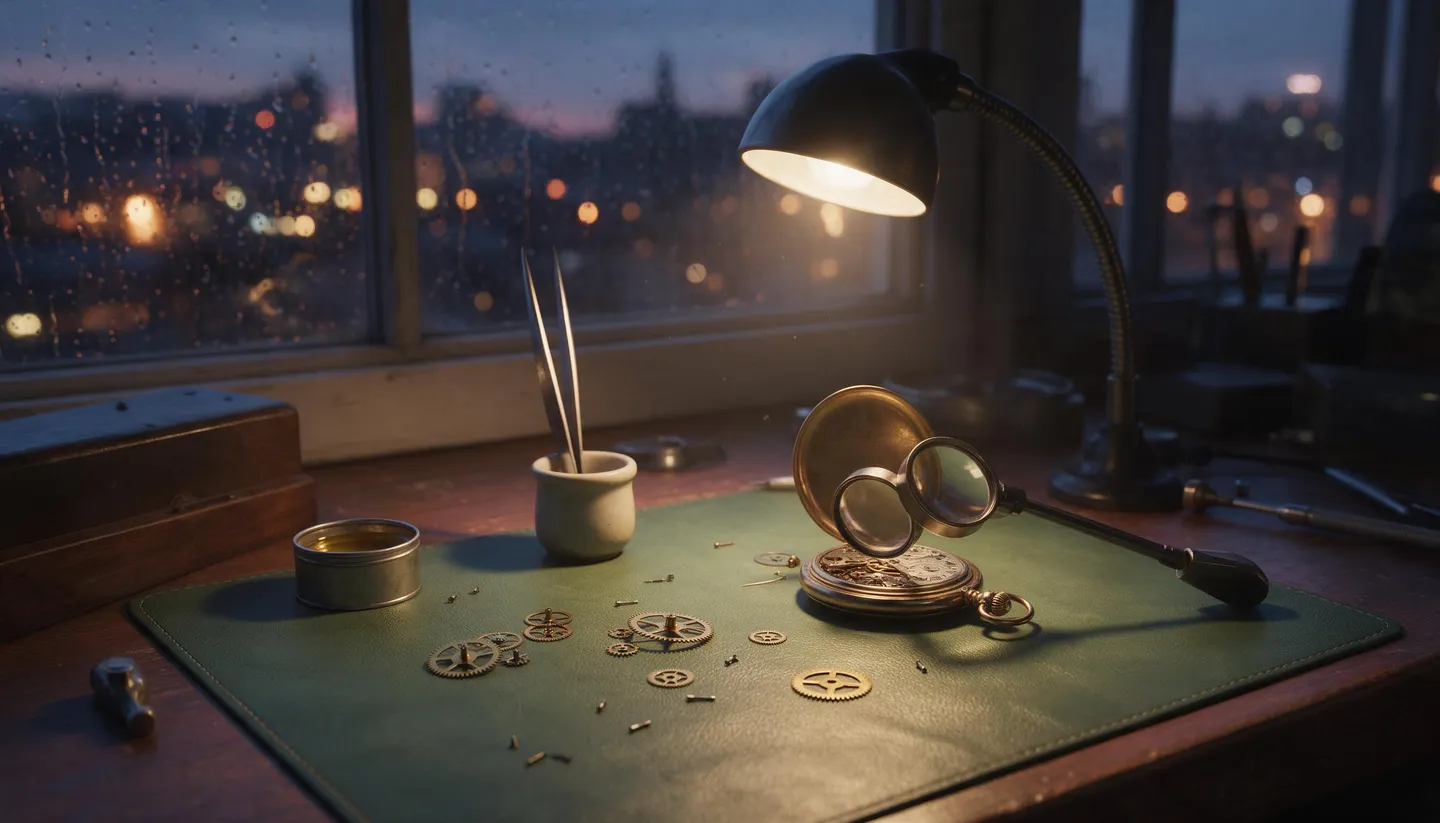
A watchmaker's workbench by a rain-streaked window at dusk. Brass gears and tiny screws are scattered across a green leather mat, a loupe rests on an open pocket watch, tweezers stand in a small ceramic cup next to a tin of oil, and a gooseneck lamp casts a warm pool of light. City lights blur outside the window. 50mm photograph, shallow depth of field.Why it works: Every object is named with its place instead of described with adjectives, and one lamp sets the light, so nothing in the busy scene gets lost.
Lettering that reads
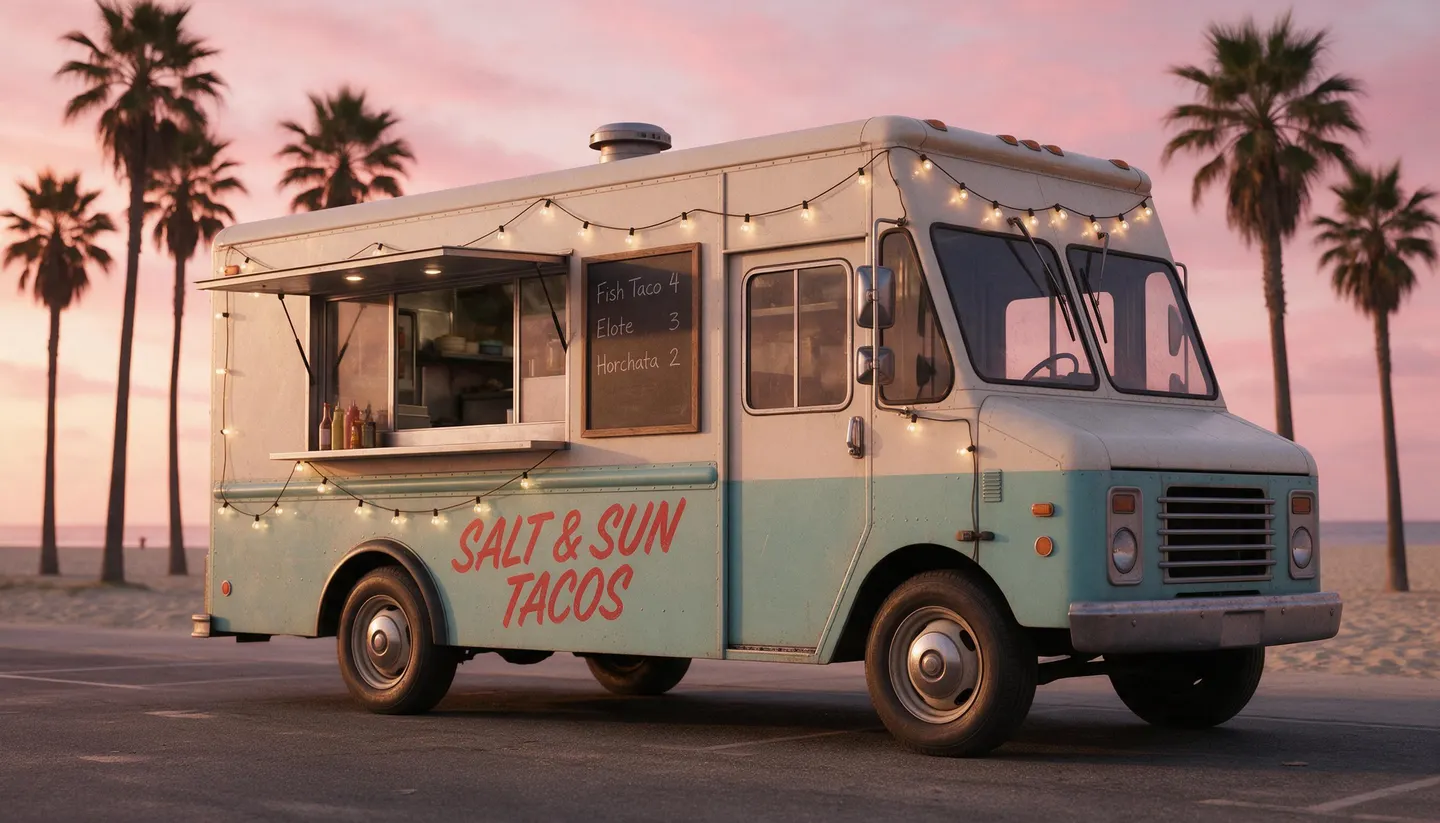
A retro food truck parked on a beach road at sunset. Its side is painted with the name "SALT & SUN TACOS" in hand-lettered red script, and a menu board beside the window lists "Fish Taco 4", "Elote 3", and "Horchata 2" in white chalk. String lights, palm trees, and a pink sky behind it. Cinematic photograph.Why it works: Each piece of text is quoted, short, and given a surface and a style, so it comes out spelled as written.
Your Character on location
Leo (@leo) wears @rain-jacket and waits at the edge of @tram-stop on a wet evening, hands in his pockets, glancing down the street for the tram. Keep his face, his hair, and the color and cut of the jacket exactly as in their images. Photorealistic, 35mm lens at eye level, the glow of a shop window behind him from the left, reflections on the wet pavement.Why it works: The Character, the outfit, and the place each have one job, the name is bound once, and the light has a source. Swap in your own saved Character and References.
A change that leaves the rest alone
Keep the room, the camera angle, and the afternoon light exactly as they are. Replace the gray sofa with a deep green velvet sofa of the same size, and add a tall fiddle-leaf fig in a woven basket in the empty corner by the window. Both cast soft shadows to the left, like the rest of the room.Why it works: Upload the room photo first. The prompt fixes what stays, makes two named changes, and asks for shadows that match, which is what makes an edit look real.
Advanced
Advanced Seedream prompting
Techniques for more control once the basics work.
Which Seedream to use
The same prompt works across the family. Try ideas on Seedream 5.0 Flash, which is quick and costs little, then render the one you keep on Seedream 5.5, the default, with the same words. Seedream 5.0 Lite and Seedream 4.5 render larger images, and Seedream 4.0 stays available to match work made on it.
Seedream 5.5, the newest release, leads on realism and small print: ByteDance tuned its skin, light, and materials to look less glossy and closer to a photograph, and its dense small text breaks less. It is also built for long editing sessions, holding the parts you did not ask to change steady from one round to the next.
Seedream 5.0 Pro thinks your prompt through and fills it out before it draws, which makes it strong at exact counts, positions, and long instructions. On a prompt with no images attached, the Prompt Optimizer setting in Advanced trades that thinking for speed: Standard thinks the longest, Fast is quicker, and Off sends your words almost as written.
- Coordinates for pinpoint edits, and lettering in languages beyond English and Chinese, work on Seedream 5.5, Seedream 5.0 Pro, and Seedream 5.0 Flash.
- Seedream 4.0 takes no @handles, not even @image1. Upload the images and refer to them in plain words as image 1, image 2.
- On Seedream 4.5, attach a Moodboard to the prompt to carry a saved look into the picture, and describe only the subject and the scene.
Structure: whole sentences, in a sensible order
Open with what the image is, then the subject and what it is doing, then where. Add the medium, the colors, the light, and the framing only where the look matters to you.
Keep it under roughly 600 words; beyond that, details start to fall out. When a scene is crowded, walk through it place by place, such as on the top shelf, by the window, in the foreground, rather than adding more adjectives.
- A short comma brief is fine for one subject: "studio portrait of a cellist, medium format, soft key light, dark background". Move to full sentences as soon as there are several subjects or a layout.
- There is no negative prompt. Say what to leave out in a sentence of its own: "No people in the street."
- For diagrams, charts, or school material, use the exact technical terms and name the format: "A labeled diagram of the water cycle on a classroom poster, with arrows for evaporation, condensation, and precipitation."
References and Characters
Mention saved Characters and References (outfits, places, poses, objects) by their @handle, and your uploads as @image1, @image2. Seedream sees every picture as one numbered list: uploads first, then Characters in the order you first mention them, then References. Before Seedream reads the prompt, Mage swaps each mention for its number, so @leo becomes "character from image 2" and @rain-jacket "outfit from image 3".
Because of that, tell it in words what each picture is for: "Put the outfit from image 2 on the person in image 1.", "Paint image 1 in the style of image 2.", "Use image 3 as the background."
- Introduce a Character with a name once, as in "Leo (@leo) waits…", and say Leo after that. Every repeated @leo pastes the full replacement into the sentence again.
- For a face that must match exactly, mention the Character and also upload a close crop of the face: "Leo (@leo), his face exactly as in @image1, …".
- Avoid "the reference" or "the photo": give the image number and say what to take from it.
- Point at the thing to change by what it looks like, never with "it" or "that one": "the smallest cup", "the woman on the right".
- To combine several pictures into one scene, write it in two steps: first what to keep from each image (Leo's face and hair, the bottle's shape and label from @image1), then the new scene, with where everyone stands and what they do.
- An @ followed by letters always reads as a handle. An email address, or a handle you have not saved, stops the run before you are charged.
A clean identity image to save as a Character
A reference portrait of one fictional man for a film cast: mid-forties, broad shoulders, light olive skin, gray-green eyes, close-cropped salt-and-pepper hair and a short beard. He wears a navy wool overcoat over a gray crew-neck sweater and charcoal trousers. One person only, framed from the top of his head to the knees, turned slightly to his left with his face almost straight to camera and his empty hands at his sides. Plain light-gray studio backdrop, soft even light on both eyes and the fabric, natural skin. A calm, closed-mouth expression. No text, logos, or watermark. No props. One view only.Why it works: One person, a neutral pose, even light, and a short list of what to leave out make an image that works well as a saved Character. A 2:3 aspect ratio suits it.
Edits that change one thing
With an image uploaded, the prompt is an edit. First say what must stay (the pose, the face, the framing, the light), then the change with a clear verb such as add, remove, replace, change, or turn into, and finally what follows from it: the shadow, the reflection, how it sits in the light.
You can also mark the picture before you upload it, with a colored circle, an arrow, a scribble, or a box, and then refer to the mark: "Put a reading lamp where the yellow circle is."
- Text is edited the same way: "Change the words on the shop sign to "CLOSED SUNDAYS", keeping the font and the color."
- To turn a sketch, a wireframe, or a floor plan into a finished picture, say what it should become ("a photorealistic Scandinavian kitchen"), what must match ("the layout of the counters and the window exactly as in image 1"), and end with "Leave out the sketch lines and any handwriting." If the sketch has labels you want followed, add "Follow the labels written in the image."
An edit steered by marks you drew
Place a round wooden dining table where the green area is marked and a hanging pendant lamp where the orange area is marked. Keep the floor, the walls, and the window light as they are. Remove all the colored marks.Why it works: The marks say where, the words say what, and the last sentence cleans the marks away. It works on every Seedream model.
Pinpoint edits with coordinates
Seedream 5.5, Seedream 5.0 Pro, and Seedream 5.0 Flash understand positions on a 0 to 999 grid laid over each image, from 0 0 at the top-left corner to 999 999 at the bottom-right. To convert a pixel position, divide x by the image width and multiply by 1,000, then do the same for y with the height.
Write the tag right after the image it points into. A point lets the model decide how much to change around it; a box marks an exact region, from its top-left corner to its bottom-right corner.
- When a box holds more than one thing, say which one: "the man on the left in @image1 <bbox>…</bbox>". A box can also protect an area: "keep @image1 <bbox>0 650 999 999</bbox> unchanged".
- Only use coordinates you have measured, for example with the cursor readout of an image editor. A guessed box does worse than plain words.
| Write | What it does |
|---|---|
<point>x y</point> | A spot. The model decides how much around it to change. |
<bbox>x1 y1 x2 y2</bbox> | An exact region, from its top-left corner to its bottom-right corner. |
Two swaps, one protected area
Replace the alarm clock at @image1 <point>214 588</point> with a small stack of hardcover books. Replace the poster on the wall in @image1 <bbox>402 96 668 410</bbox> with a framed watercolor of a mountain lake. Keep @image1 <bbox>0 700 999 999</bbox> unchanged. Everything matches the soft evening light from the lamp on the right.Why it works: A point for the small object, a box for the poster, and a box around the bed that must not move. Try it on Seedream 5.0 Flash, then render on Seedream 5.5.
Text in the image
Write the exact words in double quotes and say where they go and how they look: the word "HARVEST" in tall green block letters along the top. Without quotes, the words are a suggestion the model may rewrite.
Say what the design is for, because that decides the layout: "A label for a jar of wildflower honey. A bee sketched in fine ink sits above the name "MEADOW GOLD", with "Raw · 250 g" in small type below."
- Seedream 5.5, Seedream 5.0 Pro, and Seedream 5.0 Flash write natively in 14 languages besides English and Chinese, among them Spanish, French, German, Portuguese, Japanese, Korean, Arabic, Russian, Thai, Turkish, and Vietnamese. Type the quoted words in their own script. The other Seedream models write English and Chinese.
- Short lines read most reliably. For a long paragraph, put the headline in the image and add the rest in an editor afterwards.
- Resize or restyle existing text with an edit: "Make the title twice as large and set it in the same gold as the border."
Style and light
A precise style name says more than any adjective: linocut print, watercolor storybook illustration, 1970s travel poster, isometric 3D render, claymation still, vintage botanical plate, anime background painting.
For photographs, name the kind of shot: candid street photograph, editorial fashion portrait in medium format, high-end product photography on a seamless backdrop, aerial drone photograph.
Give light a source and a direction: "Late sun comes in low from the left and throws long shadows across the table." One light, one lens, and one style set a mood more clearly than a string of mood words.
Sets and series
Each generation makes one image. For a set that belongs together, such as a campaign, a storyboard, or one character in several places, run one generation per image with the same Characters and References, and change only the sentence that sets the scene.
Asking for "four images" in one prompt still makes one picture. When a sheet is what you want, ask for that layout directly: "one image laid out as a 2×2 grid of four panels with thin white gutters".
Common mistakes
Avoid this, do this instead
Avoid: A string of keywords.
cat, window, rain, cozy, watercolorInstead: One sentence with the subject, the action, the place, and the style.
A ginger cat curled up on a cushioned window seat while rain runs down the glass, painted as a soft watercolor illustration.Avoid: An edit aimed at "it" or "that".
make that one blueInstead: The target named by what it looks like, and what stays put.
Make the smallest vase on the shelf cobalt blue, keeping its shape and position unchanged.Avoid: "Like the reference" or "the same as the photo".
A man like the one in the photo, cooking in a kitchen.Instead: The image number, and what to take from it.
The man in @image1, with his face and hair exactly as in that image, cooking in a bright home kitchen.Avoid: Size words in the prompt, such as "16:9, 4K, ultra HD".
Instead: The aspect ratio and resolution in the settings.
Avoid: "Generate five images of…".
Instead: Five generations with one change each, or one image laid out as a grid.
Avoid: The same @handle in every clause.
Instead: Leo (@leo) once, then Leo.
Avoid: Coordinates on Seedream 5.0 Lite, Seedream 4.5, or Seedream 4.0.
Instead: Plain words, or a mark drawn on the image.
Avoid: Long lists of mood adjectives.
Instead: The one light, lens, and style that create that mood.
FAQ
Seedream prompting questions
Does Seedream support negative prompts?
How long should a Seedream prompt be?
How do I keep the same person across many images?
Which languages can Seedream write in an image?
Why does Seedream ignore "4K" or "16:9" in my prompt?
Why was my Seedream request refused?
Do I write prompts for Seedream 5.0 Flash differently?
Prompting guide
More prompting guides
How to prompt Anima
How to prompt Anima on Mage: Danbooru tag order, rating tags, strong weights, escaped parentheses, and Anima prompt examples for characters and scenes.
How to prompt Chroma
Chroma prompt guide: how to prompt Chroma with one caption-style paragraph, use its negative prompt, tune steps and guidance, and copy Chroma prompt examples.
How to prompt Flux 2
Flux 2 prompt guide: how to prompt Flux 2 Dev with subject-first word order, JSON prompts, exact hex colors, and multi-image edits, with examples.
How to prompt GPT Image 2
GPT Image 2 prompt guide: how to prompt GPT Image 2.6 Flare and Sunburst for exact text, precise edits, consistent characters, and animated GIFs, with examples.
How to prompt Grok Image
Grok Imagine prompt guide: how to prompt Grok Image with xAI's subject-first order, a check-then-edit loop, and copyable photo prompt examples.
How to prompt Guava
How to prompt Guava, Mage's photorealism model: a quick start, a fill-in template, and expert tips for portraits, skin, light, lenses, edits, and text.
Make your first image with Seedream 5.5
New accounts get 300 free Gems, enough to try Seedream 5.5. No install, no credit card.
Try Seedream 5.5